
Laptop User Manual

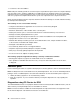
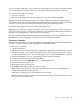
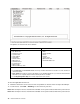
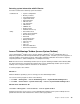
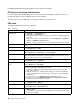
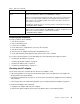
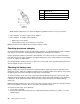
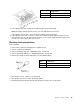


Table1.FRUtests(continued)
FRUApplicabletest
TrackPointorpointing
device
IftheTrackPointdoesnotwork,checkthecongurationasspeciedintheBIOSSetup
Utility.IftheTrackpointisdisabled,selectAutomatictoenableit.
AfteryouusetheTrackPoint,thepointermaydriftonthescreenforashorttime.This
driftcanoccurwhenaslight,steadypressureisappliedtotheTrackPointpointer.
Thissymptomisnotahardwareproblem.Ifthepointerstopsafterashorttime,no
serviceactionisnecessary.
IfenablingtheTrackPointdoesnotcorrecttheproblem,continuewiththefollowing:
•InteractiveTests®Mouse
TouchPad
IftheTouchPaddoesnotwork,checkthecongurationasspeciedintheBIOSSetup
Utility.IftheTouchPadisdisabled,selectAutomatictoenableit.IfenablingtheTouch
Paddoesnotcorrecttheproblem,continuewiththefollowing:
•InteractiveTests®Mouse
Powersystemcheckout
Toverifyasymptom,dothefollowing:
1.Turnoffthecomputer.
2.Removethebatterypack.
3.Connecttheacadapter.
4.Checkthatpowerissuppliedwhenyouturnonthecomputer.
5.Turnoffthecomputer.
6.Disconnecttheacadapterandinstallthechargedbatterypack.
7.Checkthatthebatterypacksuppliespowerwhenyouturnonthecomputer.
Ifyoususpectapowerproblem,seetheappropriateoneofthefollowingpowersupplycheckouts:
•“CheckingtheACadapter”onpage41
•“Checkingoperationalcharging”onpage42
•“Checkingthebatterypack”onpage42
•“Checkingthebackupbattery”onpage43
CheckingtheACadapter
YouareherebecausethecomputerfailsonlywhentheACadapterisused.
•Ifthepowerproblemoccursonlywhenthedockingstationortheportreplicatorisused,replacethe
dockingstationortheportreplicator.
•Ifthepower-onindicatordoesnotturnon,checkthepowercordoftheACadapterforcorrectcontinuity
andinstallation.
•Ifthecomputerdoesnotchargeduringoperation,goto“Checkingoperationalcharging”onpage42.
TochecktheACadapter,dothefollowing:
1.UnplugtheACadaptercablefromthecomputer.
2.MeasuretheoutputvoltageattheplugoftheACadaptercable.Seethefollowinggure:
Chapter3.Generalcheckout41