
Laptop User Manual

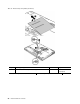
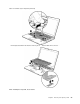

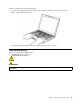
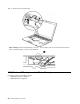
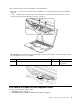
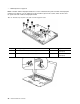
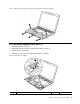
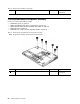

Table16.Installationstepsofkeyboard(continued)
3.Tomakesurethatthefrontsideofthekeyboardishousedrmly,gentlypressthekeyswithyourthumbs
andtrytoslidethekeyboardtowardyou.
4.Securethekeyboardbytighteningthescrewsfromthebottomsideofthecomputer.
1080Backupbattery
Foraccess,removetheseFRUsinorder:
•“1010Batterypack”onpage75
•“1070Keyboard”onpage85
DANGER
Useonlythebatteryspeciedinthepartslistforyourcomputer.Anyotherbatterycouldignite
orexplode.
Chapter8.RemovingandreplacingaFRU89