
Laptop User Manual
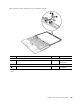



TheLCDpanelandtheperipheralpartsusedinthisproductareverysensitive.Improperhandlingofthe
LCDpanelcancausedamagetotheparts,andmaycauseasystemmalfunctionsuchasamissingdot,
missingline,orpixelproblems.
•DONOTapplyanykindofpressuretotheLCDpanel.
•WhenyoulifttheLCDpanel,alwaysholdtheleftandrightedgesofthepanelwithbothofyourhands.DO
NOTholdthepanelwithonehandorholdthetopandbottomedgesofthepanel.
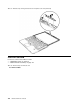
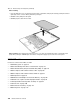
•DONOTtouchorapplyanykindofpressuretotheprintcircuitboardorsensitivepartsasshown
inthegure
a .
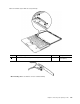
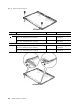
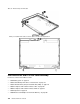
Table31.RemovalstepsofLCDpanel
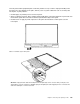
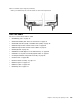
Attention:UnplugtheLCDcablewithholdingtheleftandrightedgesoftheconnectorwithyourngers,and
gentlypulltheconnectortowardyou.DONOTunplugitwithpullingthecable.Applyingtensioncouldcausethe
cabletobedamagedorawiretobebroken.
Chapter8.RemovingandreplacingaFRU119