
Laptop User Manual
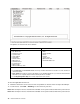
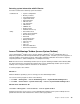
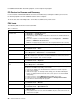
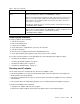
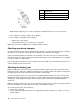


Theoptionsonthetestmenuareasfollows:
DiagnosticsInteractiveTests
•RunNormalTest
•RunQuickTest
•CPU/Coprocessor
•Systemboard
•VideoAdapter
•FixedDisks
•DisketteDrives
•OtherDevices
•ThinkPadDevices
•Communication
•WirelessLAN
•AdvancedMemoryTests
•Keyboard
•Video
•InternalSpeaker
•Mouse
•Diskette
•SystemLoad
•OpticalDriveTest
•IntelWLANRadioTest
Notes:
•IntheKeyboardtestinInteractiveTests,theFnkeyshouldbehelddownforatleast2seconds;otherwise,it
cannotbesensed.
•VideoAdaptertestsupportsonlytheLCDdisplayontheThinkPadNotebook.Ifyouhaveanexternalmonitor
attachedtoyourcomputer,detachitbeforerunningPC-DoctorforDOS.
•TotestDigitalSignatureChip,thesecuritychipmustbesettoActive.
10.Runtheapplicablefunctiontest.
11.Followtheinstructionsonthescreen.Ifthereisaproblem,PC-Doctorshowsmessagesdescribingit.
12.Toexitthetest,selectQuit—ExitDiag.Tocancelthetest,pressEsc.
Note:AfterrunningPC-Doctor,checkthetimeanddateonthesystemandresetthemiftheyareincorrect.
Note:AfterrunningPC-Doctor,checkthetimeanddateonthesystemandresetthemiftheyareincorrect.
38HardwareMaintenanceManual