ThinkPad® CD-RW/DVD Combination Ultrabay™2000 Drive User’s Guide
ThinkPad® CD-RW/DVD Combination Ultrabay™2000 Drive User’s Guide
CAUTION Before installing this product, read the ThinkPad System Safety Booklet. Note Be sure to keep your proof of purchase, because it might be required for warranty services. (See “Appendix B. Product warranty and notices” on page 3-3.
Contents Part 1. About the CD-RW/DVD Combination Ultrabay Product registration . . . . . . . . . . . . Product description . . . . . . . . . . . . Installation requirements. . . . . . . . . . . Installing the drive. . . . . . . . . . . . . Locating the drive controls . . . . . . . . . . Using the drive . . . . . . . . . . . . . . Before you begin . . . . . . . . . . . . Handling and caring for a DVD or CD . . . . . Caring for the CD-RW/DVD drive . . . . . . Loading a DVD or CD . . . . . . . . . .
Part 2. Appendixes . . . . . . . . . . . . . Appendix A. Help and service information . . . . . Online technical support . . . . . . . . . . . Telephone technical support . . . . . . . . . Appendix B. Product warranty and notices . . . . . IBM Statement of Limited Warranty . . . . . . . Notices . . . . . . . . . . . . . . . . Trademarks . . . . . . . . . . . . . . . Federal Communications Commission (FCC) statement iv . . . . . . . . . . . . . . . . . .
Part 1. About the CD-RW/DVD Combination Ultrabay 2000 Drive Product registration Thank you for purchasing OPTIONS by IBM®. Please take a few moments to register your product and provide us with information that will help IBM to better serve you in the future. Your feedback is valuable to us in developing products and services that are important to you, as well as in developing better ways to communicate with you. Register your option on the IBM Web site at: www.ibm.
Contact your place of purchase if an item is missing or damaged. Be sure to retain your proof of purchase. It might be required to receive warranty service. See “Appendix A. Help and service information” on page 3-1 for technical support information.
3 Manual eject hole Use this emergency release to eject the DVD or CD when the Eject button does not work. For more information on manually ejecting a DVD or CD, go to “Manually ejecting a DVD or CD” on page 1-5. Using the drive This section provides information on how to handle and care for DVDs, CDs, and your CD-RW/DVD drive, and how to load DVDs or CDs into your drive.
v Handle the disc by the edges or the center hole. Do not touch the surface of the disc. v To remove dust or fingerprints, wipe the disc from the center to the edge with a soft, lint-free cloth. v Do not write on the surface. v Do not place the disc in direct sunlight. v Do not use commercial cleaners to clean the disc. v Do not bend the disc. Caring for the CD-RW/DVD drive To protect your drive during operation, observe the following precautions: v Remove any disc from the drive before moving the drive.
Loading a DVD or CD 1. Press the Eject button. The tray slides out of the drive. 2. Place the disc in the tray with the label facing up. 3. Close the tray by gently pushing the tray in until it latches. Attention: Do not use force or insert foreign objects to open the tray. If your tray does not open when you press the Eject button, see “Manually ejecting a DVD or CD” for more information.
Note: If you are reinstalling Windows NT 4.0, you need to install the IDE driver. To check whether the IDE drive is installed, double-click SCSI Adapter in the Control Panel; then make sure the ThinkPad PIIX4 IDE Driver appears in the Driver window. Notes: 1. Under Windows NT, the ThinkPad A21e cannot play back the contents of a DVD. 2. For Windows 95, the DVD movie player is supported by Windows 95 OSR2.0 or later versions. You can check which version of Windows 95 you are using by doing the following: a.
3. Click the Hardware tab. 4. Click the Device Manager button. 5. Click IDE ATA/ATATI controller to pull down the submenu. 6. Double-click Secondary IDE. (Double-click Primary IDE if you are using the ThinkPad A21e.) 7. Select the DMA is available as the Transfer Mode. 8. Click OK. 9. Click Close to close “System Properties” window. A message appears, informing you that the system settings have changed. 10. Click OK to restart the system. Installing DVDExpress To install DVDExpress, do the following: 1.
Table 1-1. (continued) Region code Region 5 Former Soviet Union, the rest of Africa, India 6 People’s Republic of China Start DVDExpress by inserting the DVD into the drive. The region code is automatically set and you can see the movie. This is the initial setting. After the region code has been set, if you insert a DVD whose region code is different, you are prompted if you want to change the region code. You can change the region code from your initial setting up to four times.
Using CD-R and CD-RW The CD-RW/DVD drive can write to both CD-R and CD-RW discs. CD-R discs cannot be erased, but can be used with standard CD-ROM drives and CD players. You can use CD-R discs to record audio tracks, store data, archive files, and copy files from another CD. CD-RW discs can be erased and rewritten, but can be used only with newer MR- and CD-RW-compatible CD-ROM and DVD-ROM drives. You can use CD-RW discs to back up, store, and update files or to copy files from another CD. Notes: 1.
This message appears if you reboot or restart your ThinkPad computer with the DVD-ROM left in the CD-RW/DVD drive. Remove the DVD-ROM from the drive and then reinsert it. If the problem persists, check the drive assignments. Assignments should not skip letters. Suppose, for example, that you have assigned the hard disc drive as the C drive and the CD-RW/DVD drive as the E drive, and nothing has been assigned as the D drive. In this case, you would need to assign the drive as the D drive.
3. Turn off the computer. Wait 45 seconds; then turn on the computer and try using the Eject button again. 4. If other methods do not work, use the manual-eject hole, using instructions given in “Manually ejecting a DVD or CD” on page 1-5. You cannot read from the CD after successfully writing to it. Take the following actions: 1. If you can read the CD in another CD player or you can see previous sessions, the directory information might be damaged on the volume, making it unreadable.
1-12 ThinkPad® CD-RW/DVD Combination Ultrabay™2000 Drive User’s Guide
About the CD-RW/DVD Combination Ultrabay 2000 Drive (Translate) Product registration Thank you for purchasing OPTIONS by IBM. Please take a few moments to register your product and provide us with information that will help IBM to better serve you in the future. Your feedback is valuable to us in developing products and services that are important to you, as well as in developing better ways to communicate with you. Register your option on the IBM Web site at: www.ibm.
v IBM CD-RW software CD-ROM v Laser Safety Guide Note: Your option kit might also contain an update diskette for IBM DVD software or IBM CD-RW software. Contact your place of purchase if an item is missing or damaged. Be sure to retain your proof of purchase. It might be required to receive warranty service. See “Appendix A. Help and service information” on page 3-1 for technical support information.
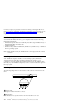
Locating the drive controls The following diagram shows the location of the controls on the front of the drive. 1 Power light This light is visible when drive is in use. 2 Eject button Press this button to eject the DVD or CD when the drive is in use. 3 Manual eject hole Use this emergency release to eject the DVD or CD when the Eject button does not work. For more information on manually ejecting a DVD or CD, go to “Manually ejecting a DVD or CD” on page 1-5.
v The read and write results of the drive depend upon the quality and characteristics of the DVD or CD media used. Poor results may be obtained with some CD-R and CD-RW suppliers. Handling and caring for a DVD or CD Carefully handle and clean discs, especially writable media types such as CD-R and CD-RW discs, so that they remain readable. You can prolong the life of your discs by using the following precautions. Attention: Wiping a disc using a circular motion can cause loss of data.
– High temperature, high humidity, or direct sunlight – Excessive vibration, sudden shock, or inclined surface – Excessive dust Loading a DVD or CD 1. Press the Eject button. The tray slides out of the drive. 2. Place the disc in the tray with the label facing up. 3. Close the tray by gently pushing the tray in until it latches. Attention: Do not use force or insert foreign objects to open the tray.
1. Enable the DMA setting (Windows 98, Windows 95, and Windows 2000 users only). 2. Install DVDExpress™ (the DVD movie player program). Note: If you are reinstalling Windows NT 4.0, you need to install the IDE driver. To check whether the IDE drive is installed, double-click SCSI Adapter in the Control Panel; then make sure the ThinkPad PIIX4 IDE Driver appears in the Driver window. Notes: 1. Under Windows NT, the ThinkPad A21e cannot play back the contents of a DVD. 2.
For Windows 2000 1. Click Start, move the cursor to Settings, and click Control Panel. 2. Double-click System. 3. Click the Hardware tab. 4. Click the Device Manager button. 5. Click IDE ATA/ATATI controller to pull down the submenu. 6. Double-click Secondary IDE. (Double-click Primary IDE if you are using the ThinkPad A21e.) 7. Select the DMA is available as the Transfer Mode. 8. Click OK. 9. Click Close to close “System Properties” window.
Table 2-1. (continued) Region code Region 2 Europe, Middle East, South Africa, Japan 3 Southeast Asia, Taiwan, Korea 4 Latin America, Australia, New Zealand 5 Former Soviet Union, the rest of Africa, India 6 People’s Republic of China Start DVDExpress by inserting the DVD into the drive. The region code is automatically set and you can see the movie. This is the initial setting.
2. Audio or video streams are decoded by software. The audio and video subsystems need to be fully functional and enabled. Using CD-R and CD-RW The CD-RW/DVD drive can write to both CD-R and CD-RW discs. CD-R discs cannot be erased, but can be used with standard CD-ROM drives and CD players. You can use CD-R discs to record audio tracks, store data, archive files, and copy files from another CD.
When you play DVDExpress with Windows 98 or Windows 95, the “No valid disc/Drive found” message appears. This message appears if you reboot or restart your ThinkPad computer with the DVD-ROM left in the CD-RW/DVD drive. Remove the DVD-ROM from the drive and then reinsert it. If the problem persists, check the drive assignments. Assignments should not skip letters.
1. Eject the CD through software. 2. Use the Eject button. 3. Turn off the computer. Wait 45 seconds; then turn on the computer and try using the Eject button again. 4. If other methods do not work, use the manual-eject hole, using instructions given in “Manually ejecting a DVD or CD” on page 1-5. You cannot read from the CD after successfully writing to it. Take the following actions: 1.
2-12 ThinkPad® CD-RW/DVD Combination Ultrabay™2000 Drive User’s Guide
Part 2. Appendixes This section contains information on help and service, product warranties, and notices. Appendix A. Help and service information This section contains information on how to obtain online and telephone technical support. Online technical support Online technical support is available during the life of your product. Online assistance can be obtained through the Personal Computing Support Web site and the IBM Automated Fax System.
If possible, be at your computer. Your technical support representative might want to walk you through the problem during the call. For the support telephone number and support hours by country, refer to the following table. If the number is not provided, contact your IBM reseller or IBM marketing representative. Response time may vary depending on the number and nature of the calls received. Support 24 hours a day, 7 days a week Canada (Toronto only) 416-383-3344 Canada (all other) 1-800-565-3344 U.S.
Appendix B. Product warranty and notices This section contains the warranty period for your product and the IBM Statement of Limited Warranty. Machine - IBM ThinkPad CD-RW/DVD Combination Ultrabay 2000 Drive Warranty Period* - One year *Contact your place of purchase for warranty service information. Some IBM Machines are eligible for on-site warranty service depending on the country where service is performed.
which IBM is not responsible. The warranty is voided by removal or alteration of Machine or parts identification labels. THESE WARRANTIES ARE YOUR EXCLUSIVE WARRANTIES AND REPLACE ALL OTHER WARRANTIES OR CONDITIONS, EXPRESS OR IMPLIED, INCLUDING, BUT NOT LIMITED TO, THE IMPLIED WARRANTIES OR CONDITIONS OF MERCHANTABILITY AND FITNESS FOR A PARTICULAR PURPOSE. THESE WARRANTIES GIVE YOU SPECIFIC LEGAL RIGHTS AND YOU MAY ALSO HAVE OTHER RIGHTS WHICH VARY FROM JURISDICTION TO JURISDICTION.
Code updates from an IBM Internet Web site or from other electronic media, and following the instructions that IBM provides. When warranty service involves the exchange of a Machine or part, the item IBM or your reseller replaces becomes its property and the replacement becomes yours. You represent that all removed items are genuine and unaltered. The replacement may not be new, but will be in good working order and at least functionally equivalent to the item replaced.
1. damages for bodily injury (including death) and damage to real property and tangible personal property; and 2. the amount of any other actual direct damages, up to the charges (if recurring, 12 months’ charges apply) for the Machine that is subject of the claim. For purposes of this item, the term ′′Machine’’ includes Machine Code and Licensed Internal Code. This limit also applies to IBM’s suppliers and your reseller.
Governing Law: The following replaces ′′laws of the country in which you acquired the Machine’’ in the first sentence: laws in the Province of Ontario. UNITED STATES Governing Law:The following replaces ′′laws of the country in which you acquired the Machine’’ in the first sentence: laws of the State of New York.
binding for the parties without appeal and the arbitral award shall be in writing and set forth the findings of fact and the conclusions of law. All proceedings shall be conducted, including all documents presented in such proceedings, in the English language. The number of arbitrators shall be three, with each side to the dispute being entitled to appoint one arbitrator. The two arbitrators appointed by the parties shall appoint a third arbitrator before proceeding upon the reference.
NEW ZEALAND The IBM Warranty for Machines: The following paragraph is added to this Section: The warranties specified in this Section are in addition to any rights you may have under the Consumer Guarantees Act 1993 or other legislation which cannot be excluded or limited. The Consumer Guarantees Act 1993 will not apply in respect of any goods which IBM provides, if you require the goods for the purposes of a business as defined in that Act.
Warranty Service: If you purchase an IBM Machine in Austria, Belgium, Denmark, Estonia, Finland, France, Germany, Greece, Iceland, Ireland, Italy, Latvia, Lithuania, Luxembourg, Netherlands, Norway, Portugal, Spain, Sweden, Switzerland or United Kingdom, you may obtain warranty service for that Machine in any of those countries from either (1) an IBM reseller approved to perform warranty service or (2) from IBM.
Emirates, United Kingdom, West Bank/Gaza, Yemen, Zambia, and Zimbabwe, this Agreement will be governed by English Law and disputes relating to it will be submitted to the exclusive jurisdiction of the English courts; and 5) in Greece, Israel, Italy, Portugal, and Spain any legal claim arising out of this Statement will be brought before, and finally settled by, the competent court of Athens, Tel Aviv, Milan, Lisbon, and Madrid, respectively.
Applicability of suppliers and resellers (unchanged). FRANCE Limitation of Liability: The following replaces the second sentence of the first paragraph of this Section: In such instances, regardless of the basis on which you are entitled to claim damages from IBM, IBM is liable for no more than: (items 1 and 2 unchanged).
The following replaces the third paragraph of this Section: Unless otherwise provided by mandatory law, IBM and your reseller are not liable for any of the following: (items 1 and 2 unchanged) 3) indirect damages, even if IBM or your reseller is informed of their possibility.
IBM may have patents or pending patent applications covering subject matter described in this document. The furnishing of this document does not give you any license to these patents. You can send license inquiries, in writing, to: IBM Director of Licensing IBM Corporation North Castle Drive Armonk, NY 10504-1785 U.S.A.
HelpCenter ThinkPad Ultrabay Microsoft, Windows and Windows NT are trademarks of Microsoft Corporation in the United States, other countries, or both. Other company, product, and service names may be trademarks or service marks of others. Federal Communications Commission (FCC) statement Note: This equipment has been tested and found to comply with the limits for a Class B digital device, pursuant to Part 15 of the FCC Rules.
International Business Machines Corporation New Orchard Road Armonk, NY 10504 Telephone: 1-919-543-2193 Tested To Comply With FCC Standards FOR HOME OR OFFICE USE Industry Canada Class B emission compliance statement This Class B digital apparatus complies with Canadian ICES-003. Avis de conformite a la reglementation d’Industrie Canada Cet appareil numérique de classe B est conforme à la norme NMB-003 du Canada.
This product is in conformity with the protection requirements of EU Council Directive 89/366/ECC on the approximation of the laws of the Member States relating to electromagnetic compatibility. IBM can not accept responsibility for any failure to satisfy the protection requirements resulting from a non-recommended modification of the product, including the fitting of non-IBM option cards.
Union Europea - Normativa EMC Questo prodotto è conforme alle normative di protezione ai sensi della Direttiva del Consiglio dell’Unione Europea 89/336/CEE sull’armonizzazione legislativa degli stati membri in materia di compatibilità elettromagnetica. IBM non accetta responsabilità alcuna per la mancata conformità alle normative di protezione dovuta a modifiche non consigliate al prodotto, compresa l’installazione di schede e componenti di marca diversa da IBM.
Part Number: 12P1898 Printed in the United States of America on recycled paper containing 10% recovered post-consumer fiber.