
Instruction Manual



KINO-QM670 Mini-ITX SBC
Page 81
Î
Disabled
Disables the use of hyper threading
technology
Î
Enabled DEFAULT
Enables the use of hyper threading
technology
Î Intel® Virtualization Technology [Disabled]
Use the Intel® Virtualization Technology option to enable or disable virtualization on the
system. When combined with third party software, Intel Virtualization technology allows
several OSs to run on the same system at the same time.
Î
Disabled DEFAULT
Disables Intel Virtualization
Technology.
Î
Enabled
Enables Intel Virtualization Technology.
5.3.4 SATA Configuration
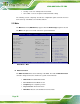
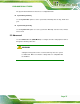
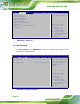
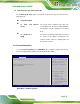
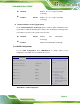
Use the SATA Configuration menu (BIOS Menu 6) to change and/or set the
configuration of the SATA devices installed in the system.
Aptio Setup Utility – Copyright (C) 2010 American Megatrends, Inc.
Advanced
SATA Configuration
SATA Controller(s) [Enabled]
SATA Mode Selection [AHCI]
SATA Port0 Empty
SATA Port1 Empty
SATA Port2 Empty
SATA Port3 Empty
Enable or disable SATA
Device.
---------------------
ÅÆ
: Select Screen
↑ ↓: Select Item
Enter Select
+/-: Change Opt.
F1: General Help
F2: Previous Values
F3: Optimized Defaults
F4: Save & Exit
ESC: Exit
Version 2.10.1208. Copyright (C) 2010 American Megatrends, Inc.
BIOS Menu 6: SATA Configuration