
User guide


14
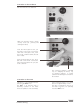
Connection of peripherals
Note: While the peripheral devices are being connected, they and the calorimeter must be
turned-off on the mains power switch!
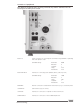
RS232 PC: Serial connection for controlling the calorimeter using CALWIN or operating
with serial printer C1.50.
Standard setting : Baud rate: 9600
Data bits: 8
Stop bits: 1
Parity: none
Handshake: none
RS232 BALANCE: Interface for connecting scales (Mettler, Ohaus, Sartorius, Kern)
Standard setting : Baud rate: 1200
Data bits: 7
Parity: odd
Stop bits: 1
Handshake: none
ETHERNET:
Network connection for data transfer via the network, e.g. to a network printer.
USB-DEVICE: USB interface (only for service).
USB-HOST: Interface for connection of a printer or with a USB mouse.
SAMPLE-RACK: Interface for connection of the C 5020 sample rack.
Commissioning