Intel® Desktop Board D945GCNL Technical Product Specification June 2007 Order Number: D98466-01US The Intel® Desktop Board D945GCNL may contain design defects or errors known as errata that may cause the product to deviate from published specifications. Current characterized errata are documented in the Intel Desktop Board D945GCNL Specification Update.
Revision History Revision -001 Revision History Date ® This is the first release of the Intel Desktop Board D945GCNL Technical Product Specification June 2007 This product specification applies to only the standard Intel Desktop Board D945GCNL with BIOS identifier NL94510J.86A. Changes to this specification will be published in the Intel Desktop Board D945GCNL Specification Update before being incorporated into a revision of this document.
Preface This Technical Product Specification (TPS) specifies the board layout, components, connectors, power and environmental requirements, and the BIOS for the Intel® Desktop Board D945GCNL. It describes the standard product and available manufacturing options. Intended Audience The TPS is intended to provide detailed, technical information about the Desktop Board D945GCNL and its components to the vendors, system integrators, and other engineers and technicians who need this level of information.
Intel Desktop Board D945GCNL Technical Product Specification WARNING Warnings indicate conditions which, if not observed, can cause personal injury. Other Common Notation iv # Used after a signal name to identify an active-low signal (such as USBP0#). (NxnX) When used in the description of a component, N indicates component type, xn are the relative coordinates of its location on the Desktop Board D945GCNL, and X is the instance of the particular part at that general location.
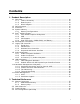
Contents 1 Product Description 1.1 Overview........................................................................................ 10 1.1.1 Feature Summary ................................................................ 10 1.1.2 Board Layout ....................................................................... 12 1.1.3 Block Diagram ..................................................................... 14 1.2 Online Support................................................................................
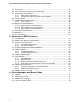
Intel Desktop Board D945GCNL Technical Product Specification 2.5 Interrupts ...................................................................................... 42 2.6 PCI Conventional Interrupt Routing Map ............................................. 43 2.7 Connectors and Headers................................................................... 44 2.7.1 Back Panel Connectors .......................................................... 45 2.7.2 Component-side Connectors and Headers ......................
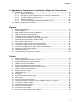
Contents 5 Regulatory Compliance and Battery Disposal Information 5.1 Regulatory Compliance..................................................................... 5.1.1 Safety Standards.................................................................. 5.1.2 European Union Declaration of Conformity Statement ................ 5.1.3 Product Ecology Statements................................................... 5.1.4 EMC Regulations .................................................................. 5.1.
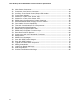
Intel Desktop Board D945GCNL Technical Product Specification 20. 21. 22. 23. 24. 25. 26. 27. 28. 29. 30. 31. 32. 33. 34. 35. 36. 37. 38. 39. 40. 41. 42. 43. viii Main Power Connector...................................................................... Processor Core Power Connector........................................................ Auxiliary Front Panel Power/Sleep LED Header..................................... Front Panel Header ....................................................................
1 Product Description What This Chapter Contains 1.1 Overview........................................................................................ 10 1.2 Online Support................................................................................ 15 1.3 Processor ....................................................................................... 15 1.4 System Memory .............................................................................. 16 1.5 Intel® 945GC Chipset .........................
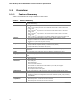
Intel Desktop Board D945GCNL Technical Product Specification 1.1 Overview 1.1.1 Feature Summary Table 1 summarizes the major features of the board. Table 1. Feature Summary Form Factor microATX (9.60 inches by 9.60 inches [243.84 millimeters by 243.
Product Description Table 1. Feature Summary (continued) Instantly Available PC Technology • Support for PCI Local Bus Specification Revision 2.3 • Support for PCI Express Revision 1.
Intel Desktop Board D945GCNL Technical Product Specification 1.1.2 Board Layout Figure 1 shows the location of the major components. Figure 1. Board Components Table 2 lists the components identified in Figure 1.
Product Description Table 2.
Intel Desktop Board D945GCNL Technical Product Specification 1.1.3 Block Diagram Figure 2 is a block diagram of the major functional areas. Figure 2.
Product Description 1.2 Online Support To find information about… Visit this World Wide Web site: Intel® Desktop Board D945GCNL http://www.intel.com/products/motherboard/D945GCNL/index.htm Desktop Board Support http://support.intel.com/support/motherboards/desktop Available configurations for the Desktop Board D945GCNL http://www.intel.com/products/motherboard/D945GCNL/index.htm Supported processors http://www.intel.com/go/findcpu Chipset information http://www.intel.
Intel Desktop Board D945GCNL Technical Product Specification 1.4 System Memory The board has two DIMM sockets and supports the following memory features: • • 1.8 V (only) DDR2 SDRAM DIMMs with gold-plated contacts Unbuffered, single-sided or double-sided DIMMs with the following restriction: Double-sided DIMMS with x16 organization are not supported. • • • • • 2 GB maximum total system memory. Refer to Section 2.1.1 on page 37 for information on the total amount of addressable memory.
Product Description 1.4.1 Memory Configurations The Intel 82945GC GMCH supports two types of memory organization: • • Dual channel (Interleaved) mode. This mode offers the highest throughput for real world applications. Dual channel mode is enabled when the installed memory capacities of both DIMM channels are equal. Technology and device width can vary from one channel to the other but the installed memory capacity for each channel must be equal.
Intel Desktop Board D945GCNL Technical Product Specification 1.5 Intel® 945GC Chipset The Intel 945GC chipset consists of the following devices: • • Intel 82945GC Graphics Memory Controller Hub (GMCH) with Direct Media Interface (DMI) interconnect Intel 82801GB I/O Controller Hub (ICH7) with DMI interconnect The GMCH component provides interfaces to the CPU, memory, PCI Express, and the DMI interconnect.
Product Description • 2D Graphics enhancements ⎯ 8, 16,and 32 bit color ⎯ Optimized 256-bit BLT engine ⎯ Color space conversion • ⎯ Anti-aliased lines Video ⎯ Hardware motion compensation for MPEG2 • ⎯ Software DVD at 30 fps full screen Display ⎯ Integrated 24-bit 400 MHz RAMDAC ⎯ Up to 2048 x 1536 at 75 Hz refresh (QXGA) ⎯ DDC2B compliant interface with Advanced Digital Display 2 or 2+ (ADD2/ADD2+) cards, support for TV-out/TV-in and DVI digital display connections ⎯ Supports flat panels up to 2048 x
Intel Desktop Board D945GCNL Technical Product Specification 1.5.1.3 Advanced Digital Display (ADD2/ADD2+) Card Support The GMCH routes two multiplexed DVO ports that are each capable of driving up to a 200 MHz pixel clock to the PCI Express x16 connector. The DVO ports can be paired for a dual channel configuration to support up to a 400 MHz pixel clock. When an ADD2/ADD2+ card is detected, the Intel GMA950 graphics controller is enabled and the PCI Express x16 connector is configured for DVO mode.
Product Description 1.5.3 IDE Support The board provides five IDE interface connectors: • • One parallel ATA IDE connector that supports two devices Four serial ATA IDE connectors that support one device per connector 1.5.3.1 Parallel ATE IDE Interface The ICH7’s Parallel ATA IDE controller has one bus-mastering Parallel ATA IDE interface. The Parallel ATA IDE interface supports the following modes: • • • • • Programmed I/O (PIO): processor controls data transfer.
Intel Desktop Board D945GCNL Technical Product Specification NOTE Many Serial ATA drives use new low-voltage power connectors and require adaptors or power supplies equipped with low-voltage power connectors. For more information, see: http://www.serialata.org/ For information about Refer to The location of the Serial ATA IDE connectors Figure 9, page 46 1.5.4 Real-Time Clock, CMOS SRAM, and Battery A coin-cell battery (CR2032) powers the real-time clock and CMOS memory.
Product Description 1.7 Legacy I/O Controller The legacy I/O controller provides the following features: • • • • • • • One serial port One parallel port with Extended Capabilities Port (ECP) and Enhanced Parallel Port (EPP) support Serial IRQ interface compatible with serialized IRQ support for PCI Conventional bus systems PS/2-style mouse and keyboard interfaces Interface for one 1.44 MB or 2.
Intel Desktop Board D945GCNL Technical Product Specification 1.8 Audio Subsystem The board supports the Intel High Definition audio subsystem based on the Realtek ALC888 audio codec. The audio subsystem supports the following features: • • • • 1.8.1 Advanced jack sense for the back panel audio jacks that enables the audio codec to recognize the device that is connected to an audio port.
Product Description 1.8.3 6 Channel (5.1) Audio Subsystem The 6 channel (5.1) audio subsystem includes the following: • • • Intel 82801GB I/O Controller Hub (ICH7) Realtek ALC888 audio codec Microphone input that supports a single dynamic, condenser, or electret microphone The back panel audio connectors are configurable through the audio device drivers. The available configurable audio ports are shown in Figure 3. Figure 3.
Intel Desktop Board D945GCNL Technical Product Specification 1.9 LAN Subsystem The LAN subsystem consists of the following: • • Realtek RTL8111B-GR device for 10/100/1000 Mbits/sec Ethernet LAN connectivity RJ-45 LAN connector with integrated status LEDs Additional features of the LAN subsystem include: • • • CSMA/CD protocol engine LAN connect interface that supports the 82562G PCI Conventional bus power management ⎯ Supports ACPI technology ⎯ Supports LAN wake capabilities 1.9.
Product Description 1.9.2.1 RJ-45 LAN Connector with Integrated LEDs Two LEDs are built into the RJ-45 LAN connector (shown in Figure 4). Figure 4. LAN Connector LED Locations Table 4 describes the LED states when the board is powered up and the 10/100/1000 Mbits/sec LAN subsystem is operating. Table 4. LAN Connector LED States LED LED Color LED State Condition A Green Blinking LAN activity is established. None Off 10 Mbits/sec data rate is selected.
Intel Desktop Board D945GCNL Technical Product Specification 1.10 Hardware Management Subsystem The hardware management features enable the board to be compatible with the Wired for Management (WfM) specification. The board has several hardware management features, including the following: • • • Chassis intrusion detection Fan monitoring and control (through the SMSC 5127 I/O Controller) Thermal and voltage monitoring 1.10.
Product Description 1.10.4 Thermal Monitoring Figure 5 shows the location of the sensors and fan headers. Item Description A Processor fan B Rear chassis fan C Thermal diode, located on processor die D Remote ambient temperature sensor E Front chassis fan Figure 5.
Intel Desktop Board D945GCNL Technical Product Specification 1.11 Power Management Power management is implemented at several levels, including: • • Software support through Advanced Configuration and Power Interface (ACPI) Hardware support: ⎯ Power connector ⎯ Fan headers ⎯ LAN wake capabilities ⎯ Instantly Available PC technology ⎯ Wake from USB ⎯ Wake from PS/2 devices ⎯ Power Management Event signal (PME#) wake-up support 1.11.
Product Description 1.11.1.1 System States and Power States Under ACPI, the operating system directs all system and device power state transitions. The operating system puts devices in and out of low-power states based on user preferences and knowledge of how devices are being used by applications. Devices that are not being used can be turned off. The operating system uses information from applications and user settings to put the system as a whole into a low-power state.
Intel Desktop Board D945GCNL Technical Product Specification 1.11.1.3 Wake-up Devices and Events Table 7 lists the devices or specific events that can wake the computer from specific states. Table 7.
Product Description NOTE The use of Wake from USB from an ACPI state requires an operating system that provides full ACPI support. 1.11.2.1 Power Connector ATX12V-compliant power supplies can turn off the system power through system control. When an ACPI-enabled system receives the correct command, the power supply removes all non-standby voltages. When resuming from an AC power failure, the computer returns to the power state it was in before power was interrupted (on or off).
Intel Desktop Board D945GCNL Technical Product Specification 1.11.2.3 LAN Wake Capabilities CAUTION For LAN wake capabilities, the +5 V standby line for the power supply must be capable of providing adequate +5 V standby current. Failure to provide adequate standby current when implementing LAN wake capabilities can damage the power supply. LAN wake capabilities enable remote wake-up of the computer through a network. The LAN network adapter monitors network traffic at the Media Independent Interface.
Product Description 1.11.2.6 Wake from PS/2 Devices PS/2 device activity wakes the computer from an ACPI S1 or S3 state. 1.11.2.7 PME# Signal Wake-up Support When the PME# signal on the PCI Conventional bus is asserted, the computer wakes from an ACPI S1, S3, S4, or S5 state (with Wake on PME enabled in BIOS). 1.11.2.8 WAKE# Signal Wake-up Support When the WAKE# signal on the PCI Express bus is asserted, the computer wakes from an ACPI S1, S3, S4, or S5 state. 1.11.2.
Intel Desktop Board D945GCNL Technical Product Specification 36
2 Technical Reference What This Chapter Contains 2.1 Memory Resources .......................................................................... 37 2.2 DMA Channels................................................................................. 39 2.3 Fixed I/O Map ................................................................................. 40 2.4 PCI Configuration Space Map ............................................................ 41 2.5 Interrupts ...............................................
Intel Desktop Board D945GCNL Technical Product Specification The amount of installed memory that can be used will vary based on add-in cards and BIOS settings. Figure 7 shows a schematic of the system memory map. All installed system memory can be used when there is no overlap of system addresses. Figure 7.
Technical Reference 2.1.2 Memory Map Table 8 lists the system memory map. Table 8. System Memory Map Address Range (decimal) Address Range (hex) Size Description 1024 K - 2097152 K 100000 - FFFFFFFF 2048 MB Extended memory 960 K - 1024 K F0000 - FFFFF 64 KB Runtime BIOS 896 K - 960 K E0000 - EFFFF 64 KB Reserved 800 K - 896 K C8000 - DFFFF 96 KB Potential available high DOS memory (open to the PCI Conventional bus). Dependent on video adapter used.
Intel Desktop Board D945GCNL Technical Product Specification 2.3 Fixed I/O Map Table 10 lists the fixed I/O map. Table 10. I/O Map Address (hex) Size Description 0000 - 00FF 256 bytes Used by the Desktop Board D945GCNL. Refer to the ICH7 data sheet for dynamic addressing information.
Technical Reference 2.4 PCI Configuration Space Map Table 11 shows the PCI configuration space map. Table 11.
Intel Desktop Board D945GCNL Technical Product Specification 2.5 Interrupts The interrupts can be routed through either the Programmable Interrupt Controller (PIC) or the Advanced Programmable Interrupt Controller (APIC) portion of the ICH7 component. The PIC is supported in Windows 98 SE and Windows ME and uses the first 16 interrupts. The APIC is supported in Windows 2000 and Windows XP and supports a total of 24 interrupts. Table 12 lists the interrupts. Table 12.
Technical Reference 2.6 PCI Conventional Interrupt Routing Map This section describes interrupt sharing and how the interrupt signals are connected between the PCI Conventional bus connectors and onboard PCI Conventional devices. The PCI Conventional specification describes how interrupts can be shared between devices attached to the PCI Conventional bus. In most cases, the small amount of latency added by interrupt sharing does not affect the operation or throughput of the devices.
Intel Desktop Board D945GCNL Technical Product Specification 2.7 Connectors and Headers CAUTION Only the following connectors have overcurrent protection: back panel USB, front panel USB, and PS/2. The other internal connectors/headers are not overcurrent protected and should connect only to devices inside the computer’s chassis, such as fans and internal peripherals. Do not use these connectors/headers to power devices external to the computer’s chassis.
Technical Reference 2.7.1 Back Panel Connectors Figure 8 shows the location of the back panel connectors. Item Description A PS/2 mouse port B PS/2 keyboard port C Parallel port D Serial port E VGA port F LAN G USB ports [4] H Audio line in I Mic in J Audio line out Figure 8. Back Panel Connectors NOTE The back panel audio line out connector is designed to power headphones or amplified speakers only.
Intel Desktop Board D945GCNL Technical Product Specification 2.7.2 Component-side Connectors and Headers Figure 9 shows the locations of the component-side connectors and headers. Figure 9.
Technical Reference Table 14 lists the component-side connectors and headers identified in Figure 9. Table 14.
Intel Desktop Board D945GCNL Technical Product Specification Table 15.
Technical Reference 2.7.2.1 Power Supply Connectors The board has power supply connectors: • • # Main power – a 2 x 12 connector. This connector is compatible with 2 x 10 connectors previously used on Intel Desktop boards. The board supports the use of ATX12V power supplies with either 2 x 10 or 2 x 12 main power cables. When using a power supply with a 2 x 10 main power cable, attach that cable on the rightmost pins of the main power connector, leaving pins 11, 12, 23, and 24 unconnected.
Intel Desktop Board D945GCNL Technical Product Specification 2.7.2.2 Add-in Card Connectors The board has the following add-in card connectors: • • • One PCI Express x16 connector supporting simultaneous transfer speeds up to 4 GBytes/sec of peak bandwidth per direction and up to 8 GBytes/sec concurrent bandwidth. One PCI Express x1 connector. The x1 interface supports simultaneous transfer speeds up to 250 Mbytes/sec of peak bandwidth per direction and up to 500 MBytes/sec concurrent bandwidth.
Technical Reference 2.7.2.4 Front Panel Header This section describes the functions of the front panel header. Table 23 lists the signal names of the front panel header. Figure 10 is a connection diagram for the front panel header. Table 23.
Intel Desktop Board D945GCNL Technical Product Specification 2.7.2.4.1 Hard Drive Activity LED Header [Yellow] Pins 1 and 3 [Yellow] can be connected to an LED to provide a visual indicator that data is being read from or written to a hard drive. Proper LED function requires one of the following: • • A Serial ATA hard drive connected to an onboard Serial ATA connector An IDE hard drive connected to an onboard IDE connector 2.7.2.4.
Technical Reference 2.7.2.5 Front Panel USB Headers Figure 11 is a connection diagram for the front panel USB headers. # INTEGRATOR’S NOTES • • • • The +5 V DC power on the USB headers is fused. Pins 1, 3, 5, and 7 comprise one USB port. Pins 2, 4, 6, and 8 comprise one USB port. Use only a front panel USB connector that conforms to the USB 2.0 specification for high-speed USB devices. Figure 11.
Intel Desktop Board D945GCNL Technical Product Specification 2.8 Jumper Block CAUTION Do not move the jumper with the power on. Always turn off the power and unplug the power cord from the computer before changing a jumper setting. Otherwise, the board could be damaged. Figure 12 shows the location of the jumper block. The jumper block determines the BIOS Setup program’s mode. Table 26 describes the jumper settings for the three modes: normal, configure, and recovery.
Technical Reference Table 26. BIOS Setup Configuration Jumper Settings Function/Mode Jumper Setting Configuration 1-2 The BIOS uses current configuration information and passwords for booting. Normal 3 2 1 Configure After the POST runs, Setup runs automatically. The maintenance menu is displayed. 2-3 3 2 1 The BIOS attempts to recover the BIOS configuration. A recovery diskette is required.
Intel Desktop Board D945GCNL Technical Product Specification 2.9 2.9.1 Mechanical Considerations Form Factor The board is designed to fit into an ATX- or microATX-form-factor chassis. Figure 13 illustrates the mechanical form factor of the board. Dimensions are given in inches [millimeters]. The outer dimensions are 9.60 inches by 9.60 inches [243.84 millimeters by 243.84 millimeters]. Location of the I/O connectors and mounting holes are in compliance with the ATX specification. Figure 13.
Technical Reference 2.10 Electrical Considerations 2.10.1 Power Supply Considerations CAUTION The +5 V standby line from the power supply must be capable of providing adequate +5 V standby current. Failure to do so can damage the power supply. The total amount of standby current required depends on the wake devices supported and manufacturing options. Additional power required will depend on configurations chosen by the integrator.
Intel Desktop Board D945GCNL Technical Product Specification 2.10.2 Fan Header Current Capability CAUTION The processor fan must be connected to the processor fan header, not to a chassis fan header. Connecting the processor fan to a chassis fan header may result in onboard component damage that will halt fan operation. Table 28 lists the current capability of the fan headers. Table 28. Fan Header Current Capability Fan Header Maximum Available Current Processor fan 2.0 A Front chassis fan 1.
Technical Reference 2.11 Thermal Considerations CAUTION A chassis with a maximum internal ambient temperature of 38 oC at the processor fan inlet is a requirement. Use a processor heatsink that provides omni-directional airflow to maintain required airflow across the processor voltage regulator area. CAUTION Failure to ensure appropriate airflow may result in reduced performance of both the processor and/or voltage regulator or, in some instances, damage to the board.
Intel Desktop Board D945GCNL Technical Product Specification Figure 14 shows the locations of the localized high temperature zones. Item A B C D Description Processor voltage regulator area Processor Intel 82945GC GMCH Intel 82801GB ICH7 Figure 14. Localized High Temperature Zones Table 29 provides maximum case temperatures for the components that are sensitive to thermal changes. The operating temperature, current load, or operating frequency could affect case temperatures.
Technical Reference 2.12 Reliability The Mean Time Between Failures (MTBF) prediction is calculated using component and subassembly random failure rates. The calculation is based on the Bellcore Reliability Prediction Procedure, TR-NWT-000332, Issue 4, September 1991. The MTBF prediction is used to estimate repair rates and spare parts requirements. The MTBF data is calculated from predicted data at 55 ºC. The MTBF for the D945GCNL board is 162,484 hours. 2.
Intel Desktop Board D945GCNL Technical Product Specification 62
3 Overview of BIOS Features What This Chapter Contains 3.1 3.2 3.3 3.4 3.5 3.6 3.7 3.8 3.9 3.1 Introduction ................................................................................... BIOS Flash Memory Organization ....................................................... Resource Configuration .................................................................... System Management BIOS (SMBIOS)................................................. BIOS Updates ...........................................
Intel Desktop Board D945GCNL Technical Product Specification Table 31 lists the BIOS Setup program menu features. Table 31.
Overview of BIOS Features 3.3.2 PCI IDE Support If you select Auto in the BIOS Setup program, the BIOS automatically sets up the PCI IDE connector with independent I/O channel support. The IDE interface supports hard drives up to ATA-66/100 and recognizes any ATAPI compliant devices, including CD-ROM drives, tape drives, and Ultra DMA drives. The interface also supports second-generation SATA drives.
Intel Desktop Board D945GCNL Technical Product Specification 3.5 BIOS Updates The BIOS can be updated using either of the following utilities, which are available on the Intel World Wide Web site: • • Intel® Express BIOS Update utility, which enables automated updating while in the Windows environment. Using this utility, the BIOS can be updated from a file on a hard disk, a 1.44 MB diskette, or a CD-ROM, or from the file location on the Web.
Overview of BIOS Features 3.6 Legacy USB Support Legacy USB support enables USB devices to be used even when the operating system’s USB drivers are not yet available. Legacy USB support is used to access the BIOS Setup program, and to install an operating system that supports USB. Legacy USB support operates as follows: 1. When you apply power to the computer, legacy support is disabled. 2. POST begins. 3.
Intel Desktop Board D945GCNL Technical Product Specification 3.7.3 Booting Without Attached Devices For use in embedded applications, the BIOS has been designed so that after passing the POST, the operating system loader is invoked even if the following devices are not present: • • • Video adapter Keyboard Mouse 3.7.4 Changing the Default Boot Device During POST Pressing the key during POST causes a boot device menu to be displayed.
Overview of BIOS Features 3.8 Adjusting Boot Speed These factors affect system boot speed: • • Selecting and configuring peripherals properly Optimized BIOS boot parameters 3.8.1 Peripheral Selection and Configuration The following techniques help improve system boot speed: • • • • Choose a hard drive with parameters such as “power-up to data ready” less than eight seconds, that minimize hard drive startup delays. Select a CD-ROM drive with a fast initialization rate.
Intel Desktop Board D945GCNL Technical Product Specification 3.9 BIOS Security Features The BIOS includes security features that restrict access to the BIOS Setup program and who can boot the computer. A supervisor password and a user password can be set for the BIOS Setup program and for booting the computer, with the following restrictions: • • • • • • • The supervisor password gives unrestricted access to view and change all the Setup options in the BIOS Setup program. This is the supervisor mode.
4 Error Messages and Beep Codes What This Chapter Contains 4.1 4.2 4.3 4.4 Speaker ......................................................................................... 71 BIOS Beep Codes ............................................................................ 71 BIOS Error Messages ....................................................................... 71 Port 80h POST Codes ....................................................................... 72 4.
Intel Desktop Board D945GCNL Technical Product Specification 4.4 Port 80h POST Codes During the POST, the BIOS generates diagnostic progress codes (POST-codes) to I/O port 80h. If the POST fails, execution stops and the last POST code generated is left at port 80h. This code is useful for determining the point where an error occurred. Displaying the POST-codes requires a PCI bus add-in card, often called a POST card.
Error Messages and Beep Codes Table 38.
Intel Desktop Board D945GCNL Technical Product Specification Table 38.
Error Messages and Beep Codes Table 38.
Intel Desktop Board D945GCNL Technical Product Specification Table 39.
5 Regulatory Compliance and Battery Disposal Information What This Chapter Contains 5.1 Regulatory Compliance..................................................................... 77 5.2 Battery Disposal Information............................................................. 86 5.1 Regulatory Compliance This section contains the following regulatory compliance information for Desktop Board D945GCNL: • • • • • 5.1.
Intel Desktop Board D945GCNL Technical Product Specification 5.1.2 European Union Declaration of Conformity Statement We, Intel Corporation, declare under our sole responsibility that the product Intel® Desktop Board D945GCNL is in conformity with all applicable essential requirements necessary for CE marking, following the provisions of the European Council Directive 2004/108/EC (EMC Directive) and 2006/95/EC (Low Voltage Directive).
Regulatory Compliance and Battery Disposal Information Español Este producto cumple con las normas del Directivo Europeo 2004/108/EC & 2006/95/EC. Slovensky Tento produkt je v súlade s ustanoveniami európskych direktív 2004/108/EC a 2006/95/EC. Slovenščina Izdelek je skladen z določbami evropskih direktiv 2004/108/EC in 2006/95/EC. Svenska Denna produkt har tillverkats i enlighet med EG-direktiv 2004/108/EC & 2006/95/EC. Türkçe Bu ürün, Avrupa Birliği’nin 2004/108/EC ve 2006/95/EC yönergelerine uyar. 5.1.
Intel Desktop Board D945GCNL Technical Product Specification Español Como parte de su compromiso de responsabilidad medioambiental, Intel ha implantado el programa de reciclaje de productos Intel, que permite que los consumidores al detalle de los productos Intel devuelvan los productos usados en los lugares seleccionados para su correspondiente reciclado. Consulte la http://www.intel.com/intel/other/ehs/product_ecology/Recycling_Program.
Regulatory Compliance and Battery Disposal Information Russian В качестве части своих обязательств к окружающей среде, в Intel создана программа утилизации продукции Intel (Product Recycling Program) для предоставления конечным пользователям марок продукции Intel возможности возврата используемой продукции в специализированные пункты для должной утилизации. Пожалуйста, обратитесь на веб-сайт http://www.intel.com/intel/other/ehs/product_ecology/Recycling_Program.
Intel Desktop Board D945GCNL Technical Product Specification 5.1.3.3 Lead Free Desktop Board This Desktop Board is a European Union Restriction of Hazardous Substances (EU RoHS Directive 2002/95/EC) compliant product. EU RoHS restricts the use of six materials. One of the six restricted materials is lead. This Desktop Board is lead free although certain discrete components used on the board contain a small amount of lead which is necessary for component performance and/or reliability.
Regulatory Compliance and Battery Disposal Information 5.1.4 EMC Regulations Desktop Board D945GCNL complies with the EMC regulations stated in Table 42 when correctly installed in a compatible host system. Table 42. EMC Regulations Regulation Title FCC 47 CFR Part 15, Subpart B Title 47 of the Code of Federal Regulations, Part 15, Subpart B, Radio Frequency Devices. (USA) ICES-003 Issue 4 (Class B) Interference-Causing Equipment Standard, Digital Apparatus.
Intel Desktop Board D945GCNL Technical Product Specification Japanese Kanji statement translation: this is a Class B product based on the standard of the Voluntary Control Council for Interference from Information Technology Equipment (VCCI). If this is used near a radio or television receiver in a domestic environment, it may cause radio interference. Install and use the equipment according to the instruction manual.
Regulatory Compliance and Battery Disposal Information 5.1.5 Product Certification Markings (Board Level) Desktop Board D945GCNL has the product certification markings shown in Table 43: Table 43. Product Certification Markings Description Mark UL joint US/Canada Recognized Component mark. Includes adjacent UL file number for Intel desktop boards: E210882. FCC Declaration of Conformity logo mark for Class B equipment. Includes Intel name and D945GCNL model designation. CE mark.
Intel Desktop Board D945GCNL Technical Product Specification 5.2 Battery Disposal Information CAUTION Risk of explosion if the battery is replaced with an incorrect type. Batteries should be recycled where possible. Disposal of used batteries must be in accordance with local environmental regulations. PRECAUTION Risque d'explosion si la pile usagée est remplacée par une pile de type incorrect. Les piles usagées doivent être recyclées dans la mesure du possible.
Regulatory Compliance and Battery Disposal Information WAARSCHUWING Er bestaat ontploffingsgevaar als de batterij wordt vervangen door een onjuist type batterij. Batterijen moeten zoveel mogelijk worden gerecycled. Houd u bij het weggooien van gebruikte batterijen aan de plaatselijke milieuwetgeving. ATENÇÃO Haverá risco de explosão se a bateria for substituída por um tipo de bateria incorreto. As baterias devem ser recicladas nos locais apropriados.
Intel Desktop Board D945GCNL Technical Product Specification PRECAUŢIE Risc de explozie, dacă bateria este înlocuită cu un tip de baterie necorespunzător. Bateriile trebuie reciclate, dacă este posibil. Depozitarea bateriilor uzate trebuie să respecte reglementările locale privind protecţia mediului. ВНИМАНИЕ При использовании батареи несоответствующего типа существует риск ее взрыва. Батареи должны быть утилизированы по возможности.
Regulatory Compliance and Battery Disposal Information 89
Intel Desktop Board D945GCNL Technical Product Specification 90