
User's Manual
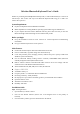


1. Now you can use your keyboard at ease.
Tips:
If you are using the Widcomm Bluetooth Software, select the keyboard icon and click the right
button of the keyboard and select “Status”, then you can check the power status of the batteries
and setup alarm for shortage of battery.
B. Match on Microsoft built-in software
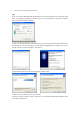
1. Make sure that the Bluetooth Function has been activated. Double click the Bluetooth Icon on
the Task Bar or in the Control Panel, open the “Bluetooth Management” window, click “Add”,
tick off “facility is ready for searching”, click “Next”.
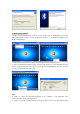
2. Wait till the keyboard is found, select keyboard and click “Next”.
3. Select” Choose a pass key for me”, click “Next”.
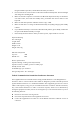
4. Input the pass key and press “Enter”, click “Next”, the system will finish the installation of the
new facility automatically.