
User's Manual


C. Match on IVT Software
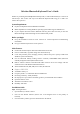
1. Make sure that the Bluetooth function is active. Double click the Bluetooth Icon, open the
Management window, select “Search for Bluetooth facilities” or click the Round Ball in the
middle of the window.
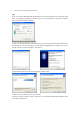
2. Click the Bluetooth Keyboard founded, click the right button for “Refresh Service”.
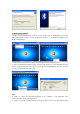
3. Select the Bluetooth Keyboard again, click the right button for “Connect-Bluetooth Input
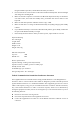
Service”, input the stochastic pass key, the system will auto install the HID facility. After that you
can use your Bluetooth Keyboard at ease.
FAQ:
If unable to connect the Bluetooth Keyboard to the computer, or the Keyboard work
unconventionally, please try the steps below:
1. Before you install your Bluetooth Keyboard, please make sure you have done the Bluetooth