
User's Manual
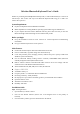

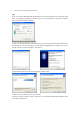
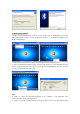
Dongle installation procedure, and the Bluetooth facility is turned on.
2. Press and release the connect button on the bottom of Bluetooth Keyboard. The blue led light
will change into a flashing mode.
3. Make sure that the Computer is connected to the Bluetooth Keyboard. If they are matched to
each other before, then under the Standby State, just double click the left button of the
keyboard.
4. Make sure that the keyboard is within the effective range---10M.
5. Make sure that there’s no change of the Bluetooth facility. If anything changed, please kindly
rematch.
6. If your Bluetooth facility is connected to other Bluetooth products, please kindly confirm that
the speed of the Bluetooth facility is enough.
7. Please kindly check the batteries. If they are short of power, replace them for new ones.
Keyboard Drawing
Size and weight
Length: 49cm
Width: 22.5cm
Height: 3.7cm
Weight: 740±10g
Materials of Keyboard
Top case: ABS
Bottom case: ABS
Electric Specifications
Operation Voltage: 3V DC (powered by batteries).
Operation Current: <=30mA, operate on a white paper.
Standby Current: 2mA
Transmit Range: up to 10 meters
Storage Temperature: -40~+125 degree
Federal Communication Commission Interference Statement
This equipment has been tested and found to comply with the limits for a Class B digital device.
Pursuant to Part 15 of the FCC Rules. These limits are designed to provide reasonable protection
against harmful interference in a residential installation. This equipment generates uses and can
radiate radio frequency energy and, if no installed and used in accordance with the instructions,
may cause harmful interference to radio or television reception, which can be determined by
turning the equipment off and on, the user is encouraged to try to correct the interference by one of
the following measures:
z Reorient or relocate the receiving antenna
z Increase the separation between the equipment and receiver.
z Connect the equipment into an outlet on a circuit different from that to which the receiver is
connected