
Install Instructions
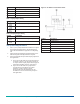
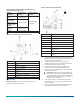
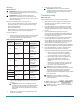
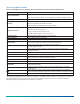
Table Of Contents

Callout Description
F Hole for mounting screw
G Label
H Probe
I Setpoint potentiometer
Table 1: Input jumper setting
Setting Description
0 VDC to 10 VDC, factory set
0 mA to 20 mA
No input
Table 2: Output jumper setting
Setting Description
0 VDC to 10 VDC or relay, factory set
0 mA to 20mA
Setup and adjustments
1. Use a 1/8 in. (3 mm) flat-blade screwdriver to adjust
the setpoint potentiometer to the humidity level
where the humidification equipment is completely
off.
2. Adjust the proportional band potentiometer to the
desired range of humidity below the setpoint.
3. Select the appropriate input and output jumpers for
the application.
a. If you use the HL-6900 as a stand-alone device
as shown in Figure 2, set the input jumper for
no input. Set the output jumper for the type of
signal the humidifier receives. See Figure 1.
b. If you use the HL-6900 as a proportional
override device, see Table 3 for jumper
positions. Figure 3 shows a typical
proportional override application for the
HL-6900. You cannot use the relay output in
this application.
Figure 2: HL-6900 as a stand-alone device
Callout Description
A HL-6900 Device
B Power
C 24 VAC transformer
D Common
E Humidification equipment
F Output
HL-6900 Multi-function Humidity Device with Temperature Sensor Installation Guide2