
Specifications




2
ENGLISH
AV to VGA converter
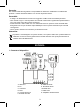
1. Connecting the device
A. Speakers G. Audio out
B. PC H. Audio in
C. LCD/CRT I. VGA in
D. DVD J. VGA out
E. Game console K. Power adapter
F. Video in
2. Buttons definition
Location 1 2 3 4 5 6
Define 1 Input Resolution Menu
Volume
down
Volume up
Define 2 Exit Enter Up Down
Define 3 Back Enter Left Right
LED
(light on
when device
is powered
on)
Safety precautions:
To reduce risk of electric shock, this product should ONLY be
opened by an authorized technician when service is
required. Disconnect the product from mains and other
equipment if a problem should occur. Do not expose the
product to water or moisture.
Maintenance:
Clean only with a dry cloth. Do not use cleaning solvents or abrasives.