
Cov lus qhia




Demo Kit Quick-Start Guide
Additional Applications and Resources
Page 13 of 15
DevSuite Quick-Start Guide – Rev. 65 onsemi reserves the right to change products or specifications without notice.
© 2022 onsemi All rights reserved.
‡Products and specifications discussed herein are for evaluation and reference purposes only and are subject to change by onsemi
without notice. Products are only warranted by onsemi to meet onsemi’s production data sheet specifications.
• Win10 and ApBaseCOM.
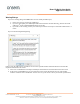
- If your Matlab application can’t connect to ApBaseCOM, do the following to ensure it is registered.
- Search for “Command Prompt” from Start menu, right click on it and select “Run as administrator”.
- Navigate to the installation folder, usually “C:\Aptina Imaging\bin”.
- Enter; %SystemRoot%\system32\regsvr32 apbasecom.dll
- A “RegSvr32” dialog will appear with “DllRegisterServer in apbasecom.dll succeeded”.