
Cov lus qhia

Demo Kit Quick-Start Guide
Application Launch
Page 8 of 15
DevSuite Quick-Start Guide – Rev. 65 onsemi reserves the right to change products or specifications without notice.
© 2022 onsemi All rights reserved.
‡Products and specifications discussed herein are for evaluation and reference purposes only and are subject to change by onsemi
without notice. Products are only warranted by onsemi to meet onsemi’s production data sheet specifications.
Warning Dialogs
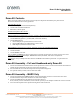
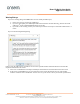
If you see a warning dialog with “DEMO3 does not run reliably on USB 2.x port;
1. Ensure you are truly connected to a USB3 port.
2. If you are, then update your USB3 Chipset FW as documented in “Trouble Shooting / Camera not found”
under the 2
nd
dash “Outdated USB3 FW drivers on the PC”.
3. If you still see the warning, contact your onsemi representative and request a new Demo3 of Revision 7 or
newer.
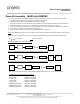
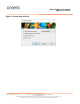
If you see the following Warning dialog;
In most cases, this indicates that you did not run the sensor-specific installer which includes the sensor data file
required to demonstrate the sensor.
1. Select “Yes” so DevWareX can attempt to identify the attached sensor and recommend corrective action.
2. If the sensor is unidentifiable or you are certain the correct sensor data file has been run, it most likely
indicates a defective sensor headboard – if that is the case, you’ll need to contact your onsemi representative.