
Operating Guide

6
OPERATING INSTRUCTIONS
Note:
The battery is not shipped fully charged. It is recommended to fully charge before rst use to
ensure that maximum run time can be achieved. This lithium-ion battery will not develop a memory
and may be charged at any time.
Low voltage charging:
If the battery has been stored with little to no charge for a long period of time, the charger will go
into recovery mode, which will take 20 hrs to fully charge the battery. This will enhance the life of the
battery. Once it is fully charged, the next charge will return to standard charging.
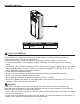
Checking battery capacity
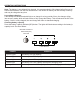
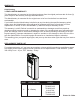
Press the battery capacity indicator (BCI) button. The lights will illuminate according to the battery’s
capacity level. See chart below:
LIGHTS CAPACITY
4 Green Lights The battery is at full capacity.
3 Green Lights The battery is at 70% capacity.
2 Green Lights The battery is at 45% capacity.
1 Green Light The battery is at 10% capacity and requires charging soon.
Lights go out The battery is under 10% capacity and requires charging immediately.
BATTERY CAPACITY
INDICATOR (BCI)
BUTTON
LIGHT METER