
User's Manual
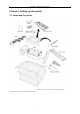
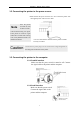
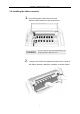
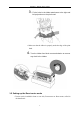
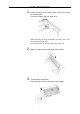
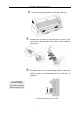
Table Of Contents
- Chapter 1 Setting up the printer
- 1.1 Unpacking the printer
- 1.2 Connecting the printer to the power source
- 1.3 Connecting the printer to the computer
- 1.4 Installing the ribbon cassette
- 1.5 Setting up the Rear tractor mode
- 1.6 Setting up the Manual mode
- 1.7 Setting up the Front tractor mode
- 1.8 Setting up the CSF (option) mode
- 1.9 Installing the printer driver
- Chapter 2 Control panel operation
- Chapter 3 Setup options
- Chapter 4 How to use SETUP Memory
- Chapter 5 Troubleshooting
- Chapter 6 Specifications

Chapter 1 Setting up the printer
2
1.2 Connecting the printer to the power source
• Make sure that the power switch is set to off. Connect the printer with
the supplied power cable to an AC outlet
Caution
Connect the AC power plug to an AC outlet of the voltage designated on
the rating plate on the back of the printer
1.3 Connecting the printer to the computer
1.3.1 Parallel interface
Make sure that the power switch is turned to off. Connect
the signal cable to the printer and the computer.
1.3.2 Serial interface
Make sure that the power switch is turned to off.
Connect the signal cable to the
printer and the computer.
Once the printe
r
is turned off, wai
t
for three seconds
or more before turning it on again.
If the printer is turned on agai
n
within three seconds after turning
it off, it may malfunction due to a
n
initialization failure.
N
ote
• The AC outlet shall be installed near the printer and shall
be easily accessible.