
User's Manual


Maintenance
OPERATION GUIDE 4-9
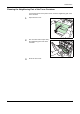
Cleaning the Neighboring Part of the Toner Container
To keep the interior of the printer clean, clean the neighboring part of the
toner container.
1
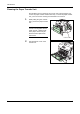
Open the front cover.
2
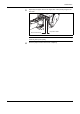
Use a lint free cloth to wipe away
the neighboring part of the toner
container.
3
Close the front cover.