
User's Manual


Maintenance
4-12 OPERATION GUIDE
Prolonged Non-Use and Moving the Printer
Prolonged Non-use
If you ever leave the printer unused for a long period of time, remove the
power cord from the wall outlet.
We recommend you consult with your dealer about the additional actions
you should take to avoid possible damage that may occur when the printer
is used next time.
Moving the Printer
When you move the printer:
• Move it gently.
• Keep it as level as possible to avoid spilling toner inside the printer.
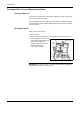
• Attach a stopper to the left side
of the printer with fixing tape as
shown on the right. The
stopper is attached near the
waste toner box after
unpacking the printer.
IMPORTANT: Be sure to consult a service technician before attempting
long-distance transportation of the printer.
Fixing Tape
Stopper