
User's Manual




Troubleshooting
OPERATION GUIDE 5-7
Clearing Paper Jams
If paper jams in the paper transport system, or no paper sheets are fed at
all, the printer automatically goes offline, and the attention indicator will
flash rapidly. KM-NET for Clients or COMMAND CENTER can indicate the
location of the paper jam (the component where the paper jam has
occurred). Remove the paper jam. After removing the paper jam, the
printer will resume printing.
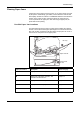
Possible Paper Jam Locations
The figure below shows the printer’s paper paths including the optional
devices. The locations where paper jams might occur are also shown here,
with each location explained in the table below. Paper jams can occur in
more than one component on the paper paths.
Paper Feeder
PF-330
MP Tray
Paper Cassette
Paper jam location Description Reference page
A Paper jam at the MP tray. page 5-9
B Paper jam at the paper cassette. The
cassette number can be 1.
page 5-9
C Paper jam inside the duplex section. page 5-10
D Paper jam inside the paper transfer unit. page 5-11
E Paper jam inside the fuser unit. page 5-12