
User's Manual



Troubleshooting
5-12 OPERATION GUIDE
3
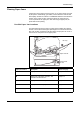
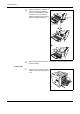
If paper is jammed as shown in A,
remove the paper by lifting the
feed cover and pulling the paper
from the center of it. If paper is
jammed as shown in B, remove the
paper by pulling the edge of it.
4
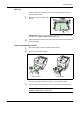
Push the paper transfer unit back in completely. The printer warms up and
resumes printing.
Fuser Unit
1
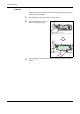
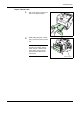
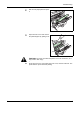
If paper is not completely ejected
into the output tray, open the rear
cover.
(A)
(B)
Registration
roller
Feed
cover