
User's Manual


Printing
3-2 OPERATION GUIDE
Connections
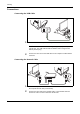
Connecting the USB Cable
1
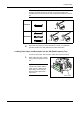
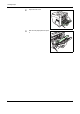
Connect the USB cable (not included) to the USB Interface Connector.
NOTE: Use a USB cable with a rectangular Type A plug and a square
Type B plug. The USB cable should be shielded and no longer than 5
meters (16 feet) long.
2
Connect the other end of the USB cable to the computer’s USB interface
connector.
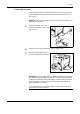
Connecting the Network Cable
1
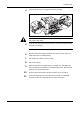
Remove the cap and connect the shielded network cable (not included) to
the computer and the hub (concentrator).
2
Connect the other side of the network cable to the Network Interface
Connector at the rear of this machine and the hub.