
User's Manual



Printing
OPERATION GUIDE 3-5
3
In Address, enter the printer’s IP address printed on a status page as the
URL. The home page displays basic information about the printer.
4
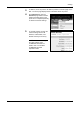
Click Advanced to open the
Advanced page which includes
advanced settings apply to the
printer and is comprised primarily
of advanced network settings.
5
In General Settings, change the
network settings such as IP
Address, Subnet Mask, and
Default Gateway if necessary.
NOTE: You can also change
the other settings using
COMMAND CENTER. For
details, refer to KYOCERA
COMMAND CENTER
Operation Guide.