
User's Guide



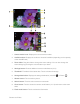
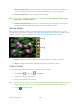
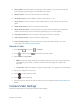
Table Of Contents
- Table of Contents
- Get Started
- Device Basics
- Phone
- Device Settings
- People
- Messaging
- Applications and Entertainment
- Web and Data
- Wi-Fi
- Data Services
- Browser
- Learn to Navigate the Browser
- Browser Menu
- Select Text on a Web Page
- Adjust Browser Settings
- Adjust Browser Privacy and Security Settings
- Adjust Browser Accessibility Settings
- Adjust Browser Advanced Settings
- Adjust Browser Bandwidth Management Settings
- Adjust Browser Labs Settings
- Set Search Engine
- Create Website Settings
- Reset the Browser to Default
- Set the Browser Home Page
- Read Web Page Offline
- Manage Bookmarks
- Camera and Video
- Tools and Calendar
- Bluetooth
- microSD Card
- Notes
- Copyrights
- Index

Camera and Video 126
Camera and Video
You can use the camera or camcorder to take and share pictures and videos. Your device
comes with a 3.2 megapixel camera that lets you capture sharp pictures and videos.
Take Pictures
Record Videos
Camera/Video Settings
View Pictures and Videos Using Gallery
Working with Photos
Share Photos and Videos
Take Pictures
Open the CameraCamera Viewfinder Screen
Review Screen
Take a Picture
Close the Camera
Open the Camera
Follow the instructions below to open the camera in photo mode and take photos.
► Press Home , and touch > Camera.
Tip:
You can open the camera from the lock screen. Flick .
Camera Viewfinder Screen
You’ll find the following controls on the camera viewfinder screen.