
Quick Start Guide




11. Product overview
22
D SERIES Tesira Quick Start Guide rev 2.2.0
11. Product overview
11.1. Front panel
1
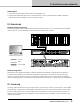
The front panel consists of an outer front with air intake and a centered user interface. The user interface has LEDs
for monitoring and six recessed touch buttons for control.
1
Rack ears for 19 inch rack mount
2
Exterior front grille (also air intake and dust lter holder)
USER INTERFACE
Unit Status and Control
3
ALARM LED for frame related status indication
4
ACTIVITY LED for amplier’s system activity status
5
STATUS LED for the amplier’s conguration status
6
POWER LED and TOUCH BUTTON for power state indication and control. A single touch of the button
toggles the amplier between ON and SLEEP state
Channel Status and Control
7
LOAD LED for load related status indication
8
AMP LED for amplier related status indication
9
SIGNAL LED for signal related status indication
10
MUTE LED and TOUCH BUTTON for mute status indication and control. A single touch on the mute button
toggles the channel between mute and unmuted states
11
SELECT LED and TOUCH BUTTON for selection and indication control between computer software and
unit. A single touch on the button will select the unit in supported computer software views. In the other direction,
when selecting the unit in a supported computer software view, the LED will indicate the unit is selected.
3 4 7 8
65
9
11