
Quick Start Guide




13. Tutorial: Basic system configuration
28
D SERIES Tesira Quick Start Guide rev 2.2.0
Create Tesira system conguration
1. Open Tesira software
2. Select Labgruppen amplier from the Object bar > I/O Blocks
3. Click somewhere in the layout window to place an amplier in the system
4. Select the correct model of amplier on the initialization dialog and click OK
5. Select Input from the Object bar > I/O Blocks
6. Click somewhere in the layout window to place an input block in the system. Select 4 channels from the
dropdown in the initialization dialog and click OK. Leave Equipment Type as Autocongure (default) for
this example
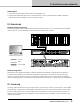
7. Connect the inputs with the amplier by drawing lines between the I/O terminals of the two blocks according
to the gure
Compile the system
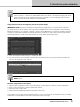
1. Compile your system by hitting the compile button in the standard Bar or select System > Compilation >
Compile active partition.