
Tesira Operation Manual




13. Tutorial: Basic system configuration
D SERIES Tesira Operation Manual rev 1.0.0
37
Assign physical units to the imaginary units in the system design
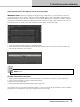
IMPORTANT NOTE: If the server is already running a previous conguration, or if you are unsure of its state,
you should check to see if it needs to reset it to become available for the current conguration. Click the Device
Maintenance button or go to System > Network > Perform Device Maintenance. If the server is already assigned,
a System ID and System Description (if entered) will show for the server. To reset, select the server and click the
Reset Device button to the left. If the cells are blank, as shown below, proceed with step 1.
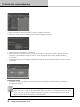
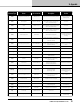
1. Enter the Equipment Table via System > Equipment Table
2. For both the server and the amplier, click the cell in the serial number or host name column and select your
unit from the dropdown menu. Click OK
NOTE: If your online devices are not available in the equipment table please recheck “IMPORTANT
NOTE” above.
Send the conguration to the system
1. Click the Send conguration button on the network bar or select System > Network > Send conguration
2. Enter a system description or leave to default and click OK
3. Click Yes to start system audio
4. Click Start All in the Manage partition audio popup. Click close
Your system is now up and running and passing audio. If you do not hear audio, the amplier may be on standby.
Double click on the amplier icon and click on the power button at top right.