
User's Manual

USB Wireless Adapter Quick Installation Guide
3
4. Driver and Utility Installation
Before you proceed with the installation, please notice following descriptions.
¾ Please do not install the adapter into your computer before installing the driver from the CD.
¾ We use driver installation in Windows XP for example. Procedures are similar for Windows
98SE/Me/2000/2003/vista/7.
¾ If you have installed the Turbo Wireless LAN USB Adapter driver & utility before, please
uninstall the old version first.
Next is driver and utility installation:
¾ Insert the Driver and Utility CD-ROM into the CD-ROM driver.
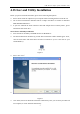
¾ The Wizard should run automatically, and the driver installation window should appear. If not,
click the Start button and choose Run and enter D:\autorun.exe (if ‘D’ is the letter of your
CD-ROM drive)
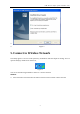
Figure 1
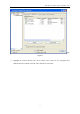
¾ Select click "Next”,
¾
Figure 2
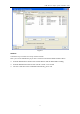
¾ Click install, then it will finish the installation automatically. Now you can insert you USB card
into computer, it will be installed automatically