
Printer User Manual



104
8.4.2.1 Site Survey (For WPS-9123 only)
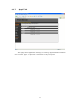
You can use this “S it e S u r ve y” f unc t io n to se arch f or avai lab l e
access points in you location. In the list is the information of all available
access points or wireless stations, includes SSID, BSSID, Channel, Type,
Encryption and Signal Strength. You can select one wireless device in
the list for this printer server to associate with or you have to go back to
“W ir eless” p a ge to m anu a l ly s et up the wir eless param eters .
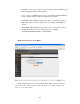
Select: c l ic k th e radi o b ut ton in t h e “ Selec t” co lum n, a nd the n c l ic k
“Subm it”. T he printer server will be connected to the wireless device you
have selected.
Refresh: c lic k “Refres h ” to updat e th e lis t.
Next Page: go to next web page.
Submit: Cl ick “Subm it ” t o c onfirm the co n nection wit h th e wir eless
device.