
Printer User Manual


105
8.4.2.2 Encryption (For WPS-9123 only)
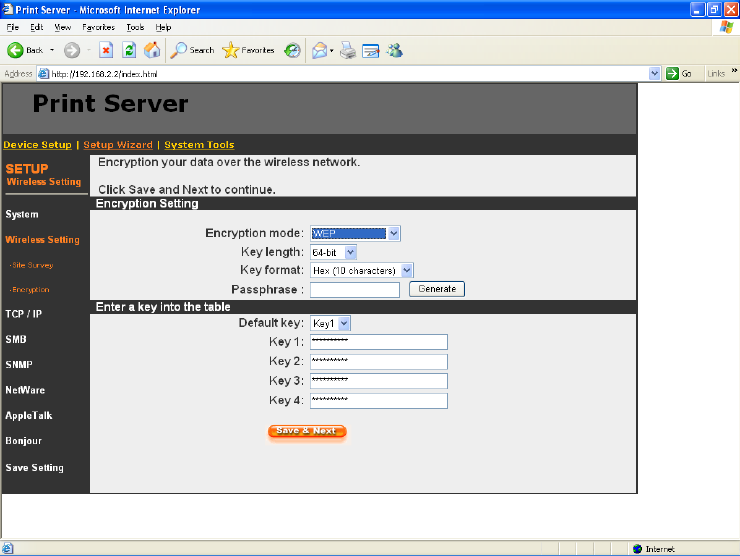
This printer server supports W EP and W PA-PSK security mode. If
you want to use W EP encryption to protect your wireless network, you
ha ve to se lec t “W EP”. If yo u wa n t to use W PA -PSK, you have to select
“W PA-s har e d k e y”. Th e w i r e less sec ur it y s etting s h ou ld b e the same with
other wireless devices in the same network.
WEP Security Mode:
Key Length – You can choose “64-bit” to use WEP with 64-bit key length
encryption or choose “128-bit” to use WEP with 128-bit key length encryption.
The longer key length can provide better security but worse transmission
throughput.
Key Format – You may select to use ASCII Characters (alphanumeric format)
or Hexadecimal digits (in the "A-F", "a-f" and "0-9" range) to be the WEP Key.
PassPhrase – A passphrase simplifies the WEP encryption process by
automatically generating the WEP encryption keys for the printer server.