
Printer User Manual


35
search and configure printer servers on other subnets across network
segments. You must use Remote Ports Utility described in the next
section to manage remote (across network segments) printer servers.
Selec t the n et w o rk por ts in t he “ Ava i la b le Ports” l ist and c lick “ >” t o
ad d ports. If yo u want to a d d all a vai l a bl e ports, p l eas e clic k “> >”. To
can c el s om e of the n etwork po rts or al l ports f rom th e “Chos en Por ts” list,
ple ase click “ <” or “ <<”.
3.5.2 Remote Ports (Utility)
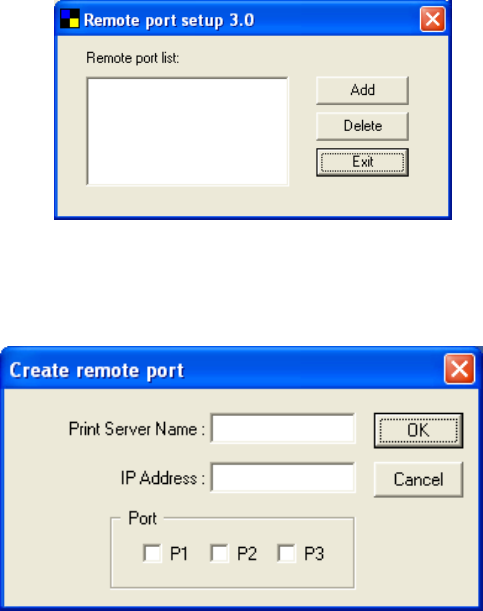
Remote Ports Utility offers a convenient way for you to manage and
add printer port of the remote printer server. From the assistant of this
utility, you can print to other printer servers outside the subnet across
network segment. However, please note that this function only supports
TCP/IP network protocol.
Please follow the procedures described below:
Step1. R u n Rem ot e Ports Ut ili t y. C lic k s “Add” to a d d a r em ot e
print port.
Step2. Enter printer server’s n am e, IP add r ess, s elect us ed port s ,
an d enter L P R queue nam e of each p o r t . Clic k “Ok”.