
Printer User Manual


76
7.13 Wireless Configuration (For WPS-9123 only)
If you want to use the printer server through wireless LAN,
please set up the printer server through Ethernet first and make sure
your wireless LAN setting is correct. After setting the wireless LAN,
unplug the Ethernet cable and restart the printer server, then you can
start to use the printer server through wireless LAN. If the wireless
configuration does not work, please plug the Ethernet cable again,
restart the printer server and configure the printer server through
Ethernet until the wireless LAN settings are correct.
The default settings of the printer server wireless function are as
follows.
Mode: Ad-Hoc
SSID: Default
Channel: 11
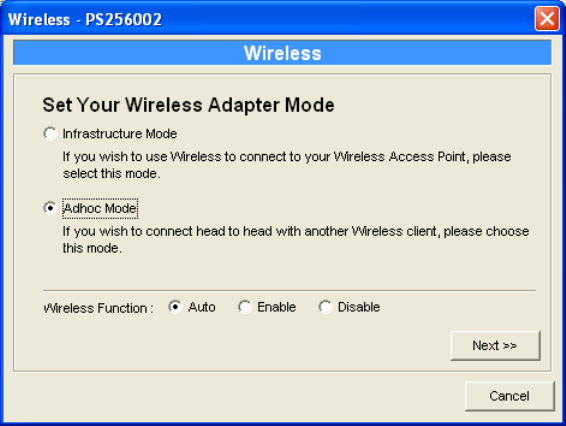
Do uble Cl ick “W ireless ” ic o n and th e w i r e less conf i g ur a tion w i nd o w
will pop-up.
If you use access point to build up wireless network, you have to
selec t “ Inf r astr uctur e Mo d e” . If you d o not ha ve a n y a c c ess po in t a n d
want to use peer-to-peer connection to build up wireless network, you
ha ve to se lec t “ A d-Hoc Mode”.
After selecting the operation modes of the wireless function, click
“Ne x t” to go t o f urther de t ai led configuration.