
User guide

ASSEMBLING AND PREPARING
10
ENG
ENGLISH
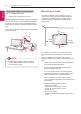
Mounting on a wall
For proper ventilation, allow a clearance of 10 cm
on each side and from the wall. Detailed installation
instructions are available from your dealer, see the
optional Tilt Wall Mounting Bracket Installation and
Setup Guide.
10 cm
10 cm
10 cm
10 cm
If you intend to mount the TV to a wall, attach Wall
mounting interface (optional parts) to the back of the
TV.
When you install the TV using the wall mounting
interface (optional parts), attach it carefully so it will not
drop.
1 Please, Use the screw and wall mount interface in
accordance with VESA Standards.
2 If you use screw longer than standard, the TV
might be damaged internally.
3 If you use improper screw, the product might be
damaged and drop from mounted position. In this
case, LG Electronics is not responsible for it.
4 VESA compatible only with respect to screw
mounting interface dimensions and mounting screw
specifications.
5 Please use VESA standard as below.
y
784.8 mm and under
* Wall Mount Pad Thickness : 2.6 mm
* Screw : Φ 4.0 mm x Pitch 0.7 mm x
Length 10 mm
y
787.4 mm and above
* Please use VESA standard wall mount pad and
screws.
Using the Kensington security system
(This not available for all models.)
y
Image shown may differ from your TV.
The Kensington security system connector is located at
the rear of the TV. For more information of installation
and using, refer to the manual provided with the Ken-
sington security system or visit
http://www.kensington.
com.
Connect the Kensington security system cable between
the TV and a table.
NOTE
y
The Kensington security system is optional.
You can obtain additional accessories from
most electronics stores.