
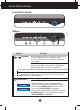
User guide

A4
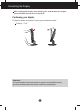
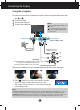
Connecting the Display
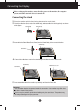
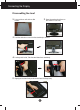
Disassembling the stand
1. Put a cushion or soft cloth on aflat
surface.
3. Push the cable deco cover from the stand body to remove.
5. Slightly pull the stand body to disconnect from the hinge body.
4. Pushing Latch inside, Take the stand base from stand body.
2. Place the monitor face Down on
the cushion or soft cloth.