
User guide

A6
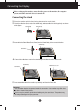
Connecting the Display
2
Using the Computer
1.
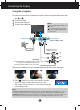
Make sure to turn off the computer and product. Connect the cable as below sketch map
form to .
Wall-outlet type
MAC
Power Cord
1
2
Mac adapter
For Apple Macintosh use, a separate plug adapter is needed
to change the 15 pin high density (3 row) D-sub VGA
connector on the supplied cable to a 15 pin 2 row connector.
3.
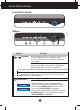
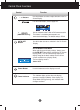
Press button on the side switch panel to turn the
power on. When monitor power is turned on, the
'Self Image Setting Function' is executed automatically.
(Only Analog Mode)
NOTE
'
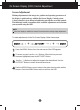
Self Image Setting Function
'
? This function provides the user with optimal display settings.When the user connects
the monitor for the first time, this function automatically adjusts the display to optimal settings for individual input signals.
'AUTO/SET Function'?
When you encounter problems such as blurry screen, blurred letters, screen flicker or tilted screen
while using the device or after changing screen resolution, press the AUTO/SET function button to improve resolution.
NOTE
This is a simplified representation of the
rear view.
This rear view represents a general
model; your display may differ from the
view as shown.
PC
1
PC
Varies according to model.
Signal Cable
A
B
C
Connect DVI Cable
Connect Dsub Cable (PC)
Connect Dsub Cable (Mac)
DVI-D(This feature is not
available in all countries.)
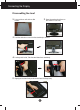
2. Connect the cable deco cover to the stand body to the direction of the arrow mark.