
User guide

5
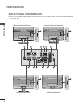
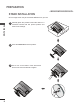
PREPARATION
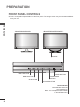
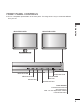
FRONT PANEL CONTROLS
■ This is a simplified representation of the front panel. The image shown may be somewhat different
from your set.
INPUT BUTTON
MENU BUTTON
OK BUTTON
VOLUME BUTTON
PROGRAMME
BUTTON
POWER BUTTON
<M2280DN/M2380DN><M2280DB/M2380DB>
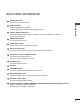
Power Indicator
illuminates blue when the
set is switched on.
Note : You can adjust Power indicator
in the OPTION menu.