- LG Computer Monitor User Manual
Manuals
Brands
LG Electronics Manuals
Monitor
W1946T W1946TN W2046T W2246T
1
2
3
4
5
6
7
8
9
10
8
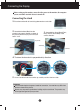
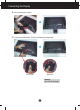
Connecting the Display
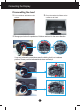
4.
Pull out the Stand to remove.
5.
Pushing the PUSH button, Take the stand body from hinge body.
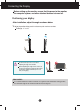
Good Position
Bad Position
Warning:
You can hurt your finger.
1
...
...
7
8
9
10
11
...
...
39