
Quick Setup Guide



14
ENGLISH
How to Run
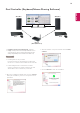
1. Connect your PC to a network.
2. Connect an LG monitor that supports Dual Controller
to the PC.
3. Run Dual Controller.
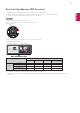
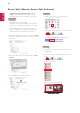
Finder Applications Run Dual Controller
Click the Dual Controller icon on the menu bar
and then click Open Dual Controller.
Search for Dual Controller in Spotlight.
How to Use
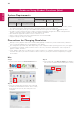
Instructions for running Dual Controller for Mac are
the same as Dual Controller for Windows. See the
instructions for Dual Controller for Windows.
Ú
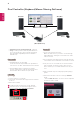
The PC whose keyboard and mouse will be shared
must be run in Main PC mode.
Ú
An LG monitor that supports Dual Controller must be
connected to the PC that will be run in Main PC mode.
Ú
The PC that you want to control with Dual Controller
must be run in Sub PC mode.
Ú
Only one user on a network can use Dual Controller.
Ú
Dual Controller may not work properly when playing
games.
Ú
We recommend that you set the Sub PC so that its
screen is only displayed on a monitor.
Ú
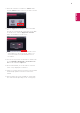
If there is an active Internet connection, Dual Control-
ler automatically updates to the latest version when
started.
Ú
Dual Controller may not be available on certain web-
sites and networks depending on the security policy.