
Quick Setup Guide

7
ENGLISH
Dual Link-Up (Monitor PBP Function)
Usage The monitor displays screens for 2 input sources simultaneously.
The Dual Link-Up feature requires that one of the two input sources is connected via HDMI.
Image shown may differ from the product that you are using.
How to Run
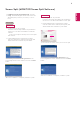
1. Connect the monitor to two input sources.
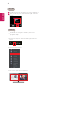
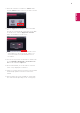
2. Press the joystick button on the bottom of the monitor.
3. Enter
1
PBP.
4. Adjust the settings according to the input sources connected.
5. DUAL LINK-UP is applied.
For details on using the software, refer to the product user manual.
The product user manual is included on the CD provided and is available for download from the LG Electronics
website.
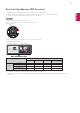
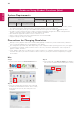
PBP Connection
Sub screen (Right)
HDMI 1 HDMI 2 DisplayPort
Thunderbolt ( )
(29UC97 model only)
Main screen
(Left)
HDMI 1 - O O O
HDMI 2 O - O O
DisplayPort O O - X
Thunderbolt ( )
(29UC97 model only)
O O X -
1
MaxxAudio
Exit
Menu PBP
Monitor off
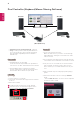
Main screen Sub screen