
Quick Setup Guide


8
ENGLISH
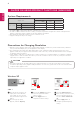
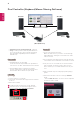
Screen Screen
Router
(Wired/Wireless)
PC 1 PC 2
Win/Mac Win/Mac
Dual Controller (Keyboard/Mouse Sharing Software)
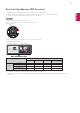
Installation priority (required/optional) Optional
Usage Sharing a mouse and a keyboard between
PCs connected to the same network; transferring
files (providing compatibility between Windows
and Mac OS)
How to Install
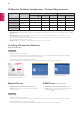
Installing with the CD provided.
Insert the manual CD provided in the product box
into the PC's CD drive and install the Dual Controller.
Downloading from the LG Electronics website.
Visit the LG Electronics website (www.lg.com) and
download the latest software for your model.
How to Run
1. Connect your PC to a network.
2. Connect an LG monitor that supports Dual Controller
to the PC.
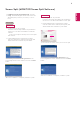
3. Run Dual Controller.
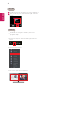
1
Double-click the shortcut icon on the desktop.
2
Click the tray icon on the bottom right of the PC
screen and then click Open Dual Controller.
1
2
How to Use
1. Check your network connection.
Make sure that the PCs you want to control through
keyboard/mouse sharing are connected to the same
LAN via a router.
Ú
An LG monitor that supports Dual Controller must be
connected to the PC that will be run in Main PC mode.
Ú
Only one user on a network can use Dual Controller.
Dual Controller can also be used in office environ-
ments. However, it is recommended to have only one
user.
Ú
Dual Controller may not work properly when playing
games.
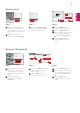
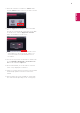
2. Run Dual Controller on the PC running in Main PC
mode.
: Click the Main PC button on the PC whose keyboard
and mouse will be shared.