
Quick Setup Guide




4
ENGLISH
Screen Split Automatically splits the monitor screen into the desired layouts.
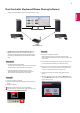
Dual Controller Software that makes it possible to use a PC's keyboard and mouse to control other PCs connected to the
same network (router).
The software listed above can be installed using the CD provided with the product or downloaded as the latest version
from the LG Electronics website.
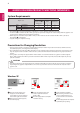
Graphics card Use a graphics card that supports 3440 x 1440 resolution.
Software
Installation Priority
(required/optional)
Supported Interface Supported OS
Thunderbolt ( )
(34UC87, 34UC87M
model only)
DisplayPort HDMI
Win 7
(32 bit/64 bit)
Win 8.1
(32 bit/64 bit)
Screen Split Optional O O O O O
Monitor Driver Optional O O O O O
Dual Controller Optional O O O O O
ASM Driver
(34UC87, 34UC87M model only)
Required O X X O O
LG Monitor Software Introduction / System Requirements
Monitor Driver
How to Install
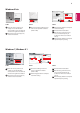
Installing with the CD provided.
Insert the user manual CD provided in the product box into the PC's CD drive and install the driver program.
Downloading from the LG Electronics website.
Visit the LG Electronics website (www.lg.com) and download the latest driver for your model.
ASM Driver
(34UC87, 34UC87M model only)
Installation priority (required/optional)
Required
Usage Driver file used when transferring data via
Thunderbolt ( ) port in Windows OS.
Installation priority (required/optional) Optional
Usage The resolution and frequency are adjusted for
the monitor.