
User guide


Table Of Contents
- תירבע
- ENGLISH
- Guidelines for safe and efficient use
- Important notice
- Getting to know your phone
- Your Home screen
- Google account setup
- Connecting to Networks and Devices
- Calls
- Contacts
- Messaging
- Camera
- Video camera
- Function
- Multimedia
- Utilities
- The Web
- Settings
- PC software (LG PC Suite)
- Phone software update
- About this user guide
- Accessories
- Troubleshooting
- FAQ
16
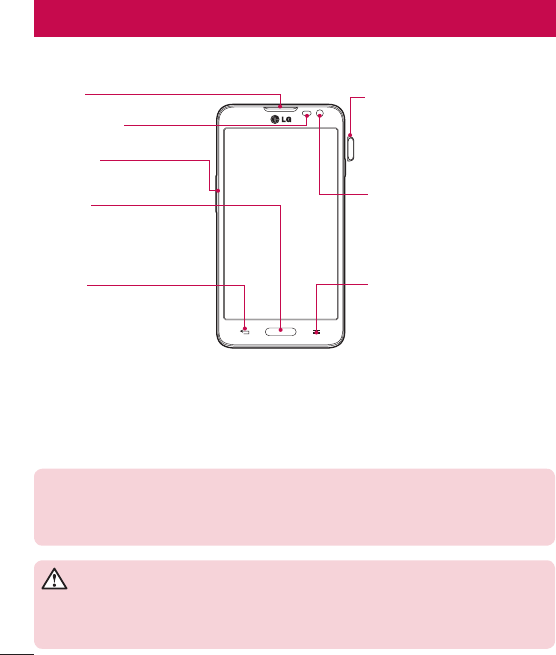
Phone overview
Proximity Sensor
Volume keys
Earpiece
Home Key
Return to the Home screen from any
screen.
Back Key
•
Return to the previous screen.
•
Exit an app after using it.
Menu Key
Display the available options.
Power/Lock Key
•
Switch your phone on/off by pressing
and holding this key.
•
Short press to lock/unlock the screen.
Front-Facing Camera lens
NOTE: Proximity sensor
When receiving and making calls, the proximity sensor automatically turns the backlight off
and locks the touch screen by sensing when the phone is near your ear. This extends battery
life and prevents you from unintentionally activating the touch screen during calls.
WARNING
Placing a heavy object on the phone or sitting on it can damage the LCD and touch screen
functions. Do not cover the LCD proximity sensor with protective film. This could cause the
sensor to malfunction.
Getting to know your phone