
User guide


Table Of Contents
- תירבע
- ENGLISH
- Guidelines for safe and efficient use
- Important notice
- Getting to know your phone
- Your Home screen
- Google account setup
- Connecting to Networks and Devices
- Calls
- Contacts
- Messaging
- Camera
- Video camera
- Function
- Multimedia
- Utilities
- The Web
- Settings
- PC software (LG PC Suite)
- Phone software update
- About this user guide
- Accessories
- Troubleshooting
- FAQ
20
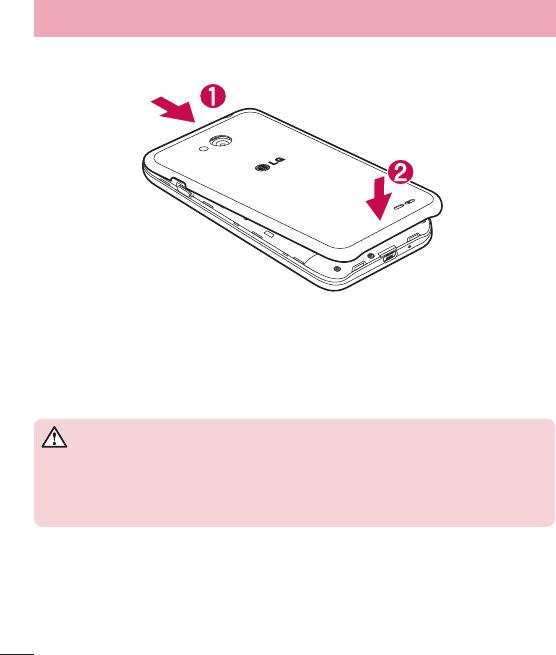
4 Align the battery cover over the battery compartment (1) and press it down until it clicks into place (2).
Charging your phone
Charge the battery before using it for the first time. Use the charger to charge the battery. A computer can be
also used to charge the device by connecting them via the USB cable.
WARNING
Use only LG-approved chargers, batteries, and cables. When using unapproved
chargers or cables, it may cause battery charging delay or pop-up message regarding
slow charging. Or, unapproved chargers or cables can cause the battery to explode or
damage the device, which are not covered by the warranty.
The charger connector is at the bottom of the phone. Insert the charger and plug it into an electrical outlet.
Getting to know your phone