
User guide


Table Of Contents
- תירבע
- ENGLISH
- Guidelines for safe and efficient use
- Important notice
- Getting to know your phone
- Your Home screen
- Google account setup
- Connecting to Networks and Devices
- Calls
- Contacts
- Messaging
- Camera
- Video camera
- Function
- Multimedia
- Utilities
- The Web
- Settings
- PC software (LG PC Suite)
- Phone software update
- About this user guide
- Accessories
- Troubleshooting
- FAQ
50
Plug & Pop
Plug & Pop allows you to quickly choose apps to use when plugging in an earphone.
1 Plug in earphone.
2 The applications panel will display and you can select an app to run.
NOTE: You can edit the applications to display on the panel and set not to show the
applications panel.
X Press > > Apps tab > Settings > General tab > Accessory > Earphone Plug & Pop.
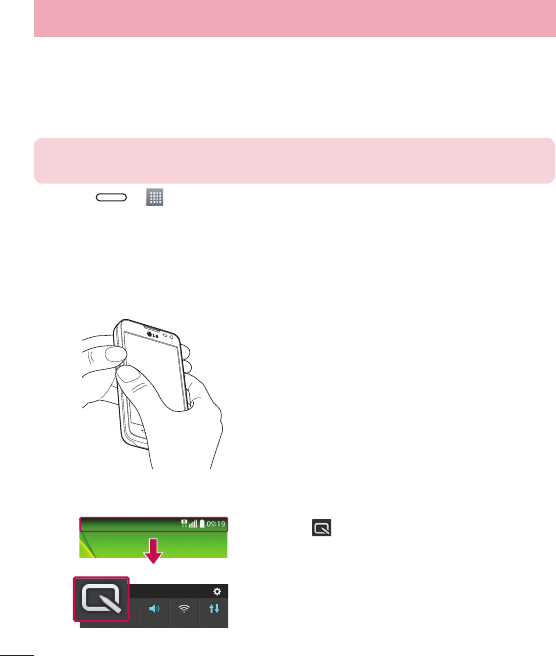
QuickMemo
The QuickMemo allows you to create memos and capture screen shots.Capture screens, draw on them and
share them with family and friends with QuickMemo.
OR
1 Enter the QuickMemo screen by pressing both
the Volume up and down keys for one second
on the screen you want to capture.
OR
Touch and slide the status bar downward and tap
.
Function