
User guide


Table Of Contents
- תירבע
- ENGLISH
- Guidelines for safe and efficient use
- Important notice
- Getting to know your phone
- Your Home screen
- Google account setup
- Connecting to Networks and Devices
- Calls
- Contacts
- Messaging
- Camera
- Video camera
- Function
- Multimedia
- Utilities
- The Web
- Settings
- PC software (LG PC Suite)
- Phone software update
- About this user guide
- Accessories
- Troubleshooting
- FAQ
56
/
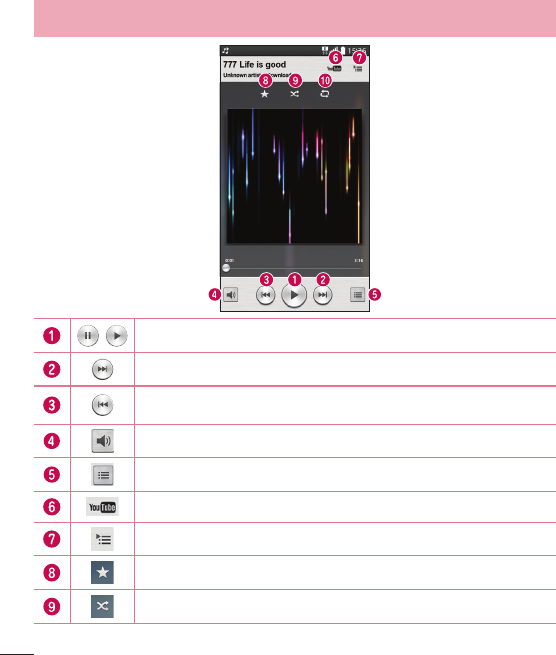
Tap to pause/ resume playback.
Tap to skip to the next track in the album, playlist, or shuffle. Touch and hold to fast forward.
Tap to restart the current track or skip to the previous track in the album, playlist, or
shuffle. Touch and hold to rewind.
Tap to display the Volume slider bar, then adjust the playback volume on the slider bar.
Touch to see all song list.
Tap to find the files with YouTube.
Tap to open the current playlist.
Tap to add the song to your favourites.
Tap to play the current playlist in shuffle mode (tracks are played in random order).
Multimedia