
Owner's Manual





36 Connections and settings
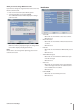
Buzzer
Button
ON: Makes a sound when using the buttons.
OFF: Turns off the button beep.
Sensor
ON: Makes a sound when a sensor occurs.
OFF: Turns off the sensor buzzer.
Motion
ON: Makes a sound when a motion is detected.
OFF: Turns off the motion buzzer.
System
ON: Makes a sound when the HDD has a bad sector.
OFF: Turns off the system buzzer.
Note:
The sensor and motion buzzer have low sound on this unit.
If you want to make a loud sound, connect an external
alarming device to the ALARM-OUT terminals (ex. Siren).
•
-
-
•
-
-
•
-
-
•
-
-
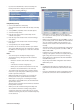
User
You can register a new user with various access rights to the
DVR or client program.
Number: Select the number to add new user ID or
change the user ID, user level or password.
ID: Enter the new user ID using the virtual keyboard.
Level: Select the level of the new user.
Password: Enter or change the password for the user
using the virtual keyboard. You can use the password
with number, special character or characters. (Minimum
4 length, Maximum 8 length).
Note:
Remember the password. If you forget the password please
contact an authorized service center or the store where you
purchased the system.
•
•
•
•