
User guide

TV
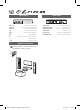
TV Connection2
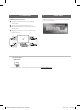
HDMI & Optical Connection
a Connect the Player to the TV using HDMI &
Optical cable.
b Set the input selector to HDMI on the TV.
c Set up [External Speaker (Optical)] on your TV
setting menu.
d Follow the instructions on the TV screen using
remote control.
For more information, download the online owner’s manual. http://www.lg.com
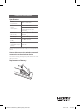
LG Sound Sync
(Wireless)
Home menu appears on the TV screen. Enjoy various
functions on the player.
Home Menu3
LHD675-FC.DGHALLC_SIMPLE_ENG_3249.indd 3 2015-10-28 11:24:04