
User guide





ENGLISH
35OPERATION
STORAGE FUNCTION
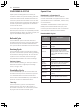
The storage function is set.
•
Once completed, a selected course will lead to the storage function.
•
During the drying course, no storage function is set.
•
After the storage function is entered and the power button pressed, the setting is
released.
•
The storage function operates for a maximum of 24 hours.
•
You can open the door anytime even during the course of the storage function.
•
This operation warms clothes with air in order to store them softly and moistlessly and
can therefore produce noises periodically. It is not a defect, but a normal operation. So
rest assured.
NOTE
1
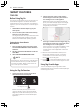
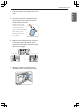
Place clothes into the Styler.
2
Press a course button to select your desired course and then press the Delay Start button to
set a storage option.
(e.g. If the reservation button is pressed for three seconds after a course is selected, the
storage LED light will be lit.)
3
Press the OPERATION / PAUSE button to start.
4
If you want to cancel the storage function, press another course button.
This image is for illustration purposes only.
IF THE BUTTON IS PRESSED FOR
FUNCTION IS SELECTED.