
User guide





ENGLISH
SMART FEATURES
TAG ON
Before Using Tag On
The Tag On function allows you to conveniently use
the LG Smart Diagnosis
TM
and Smart Download
Cycle features to communicate with your appliance
right from your own smart phone. To use the Tag On
function:
The Tag On function can only be used with smart
phones equipped with the NFC function and
based on the Android OS (operating system).
Turning On the Smart Phone’s
NFC Function
Share & Connect
Networks.
select NFC.
3 Select Use Read and Write/P2P receive.
Using the Tag On Function
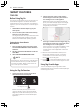
Position the smart phone by the icon when
using the Tag On function with the LG Smart
Diagnosis™, Smart Download Cycle, and One
Touch Styling features of the LG Smart Styler
application.
NOTE
Depending on the smart phone manufacturer
and Android OS version, the NFC activation
process may differ. Refer to the manual of
your smart phone for details.
(Because the antenna is positioned inside the
phone, the LG Smart Styler app shows a target
range on the smart phone's screen based on
recognized phone models.)
3
If the connection is not made immediately, move
the smart phone very slightly in a widening
circular motion until the application verifies the
connection.
• Because of the characteristics of NFC, if the
transmission distance is too far, or if there is
a metal sticker or a thick case on the phone,
transmission will not be good.
• Press [
] in the LG Smart Styler app for a more
detailed guide on how to use the Tag On function.
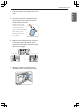
Using Tag On with Apps
Touch an LG Styler’s Tag On logo with an NFC-
equipped smart phone, and the LG Smart Styler apps
use the Tag On function.
the Tag On icon
36 SMART FEATURES