
User guide





ENGLISH
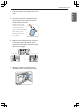
Tag On logo.
y
When a Tag On screen ap-
pears (see above), tap your
smart phone on the Tag On
icon on the right side of the
Styler’s control panel.
y
If the phone isn’t recog-
nized, touch [
] on the
upper right of the Tag On
screen on your LG Smart
Styler application to see the
detailed guide.
Tag On logo.
y
When a Tag On screen ap-
pears (see below), tap your
smart phone on the Tag On
icon on the right side of the
Styler’s control panel.
8 The new cycle is
Downloading Styler Cycles
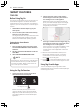
LG Smart Styler’s Smart Download Cycle app allows you to download a cycle for later use. The cycle
is available at the Downloaded cycle position on the control panel until another cycle is downloaded.
LG Smart
Styler
phone.
2 Select the Smart Download
Cycle
Select Cycle Download on
the opening screen.
ENGLISH
37SMART FEATURES